Apple Intelligence is Apple’s approach to bringing AI features directly into the iPhone, iPad, and Mac experience. Instead of treating artificial intelligence as a separate app, Apple has integrated it into everyday tasks like writing, notifications, image creation, photo organization, and Siri interactions.
Affiliate Disclaimer
This website participates in affiliate programs. We may earn a commission
when you purchase products through links on this page, at no additional
cost to you. Our recommendations are based on independent research and
honest opinions.
The biggest difference is that Apple Intelligence is designed to work within the apps you already use. You do not need to open a separate AI tool every time you want help. It can assist while writing an email, summarizing information, cleaning up photos, or finding something more naturally through Siri.
However, getting the most out of Apple Intelligence requires understanding what it can do, which devices support it, and how to set up the features correctly. In this guide, I’ll explain how Apple Intelligence works on iPhone and Mac, the most useful features to try, and a few accessories that can help protect the devices you use it on every day.
What Is Apple Intelligence?
Apple Intelligence is Apple’s built-in AI system that combines on-device processing with cloud-based computing when additional power is needed.
The goal is not simply to add another chatbot. Instead, Apple focuses on making everyday tasks easier by adding AI assistance throughout the operating system.
Some examples include:
- Writing assistance inside apps
- Smarter Siri conversations
- Notification summaries
- Image editing tools
- AI-powered search improvements
- Custom emoji and image creation features
Apple’s approach is different from many standalone AI tools because it is deeply connected with iOS and macOS.
What Can Apple Intelligence Do on iPhone?
On iPhone, Apple Intelligence works across many daily activities. The features are designed to save time rather than replace the way you normally use your phone.
Writing Tools
One of the most practical Apple Intelligence features is Writing Tools.
You can use it to:
- Rewrite text in a different style
- Adjust the tone of a message
- Summarize long text
- Proofread writing
- Create shorter versions of content
This can be useful for emails, messages, notes, and documents. Instead of manually rewriting a paragraph several times, Apple Intelligence can help refine the wording.
Smarter Siri
Apple Intelligence improves Siri by making conversations more natural.
Older versions of Siri often struggled with follow-up requests or understanding context. With Apple Intelligence improvements, Siri is designed to better understand what you mean and provide more useful responses.
Examples include:
- Asking follow-up questions
- Understanding natural language better
- Helping with device-related tasks
- Finding information across supported apps
Image Playground and Genmoji
Apple Intelligence also introduces creative image features.
Image Playground allows you to create images using simple descriptions, while Genmoji lets you create custom emoji-style images.
These features are designed for casual creativity rather than professional image generation.
You can use them for:
- Messages
- Social conversations
- Personal projects
- Fun custom reactions
Photo Cleanup and Search
Managing thousands of photos can become difficult over time.
Apple Intelligence adds smarter photo features that help you find images more easily and remove unwanted elements from photos.
Useful improvements include:
- Better natural language photo search
- Object removal tools
- More intelligent photo organization
Instead of scrolling endlessly through your library, you can describe what you are looking for.
Notification Summaries
Notifications can quickly become overwhelming.
Apple Intelligence can help summarize notifications so you can understand the important information faster.
This is useful when you receive:
- Multiple emails
- Long message threads
- App updates
- Daily notifications
The idea is to reduce unnecessary interruptions while keeping important information visible.
How to Use Apple Intelligence on iPhone
Getting started is relatively simple, but you need a compatible device and updated software.
The general process:
- Update your iPhone to a supported iOS version.
- Open Settings.
- Find Apple Intelligence settings.
- Enable the available features.
- Customize individual options based on your preference.
Some features may require additional setup, depending on your region and language settings.
What You Need for Apple Intelligence on iPhone
Apple Intelligence is not available on every iPhone model.
You need compatible hardware because many AI features require advanced processing capabilities.
Before trying the features, check:
- Your iPhone model
- Your iOS version
- Supported language and region settings
- Available storage space
A newer iPhone with stronger hardware will generally provide the best experience.
How to Use Apple Intelligence on Mac
Apple Intelligence is also built into macOS for compatible Mac computers.
On Mac, it can be especially useful because people often work with longer documents, emails, and creative projects.
Writing Assistance on Mac
The larger screen and keyboard make Mac a natural place to use writing features.
You can use Apple Intelligence to improve:
- Emails
- Reports
- Notes
- Documents
- Messages
For professionals, this can reduce the time spent editing and rewriting everyday communication.
Siri on Mac
Siri becomes more useful on Mac because it can assist while you work.
Instead of stopping your workflow to search manually, you can ask Siri for help with supported tasks.
Examples:
- Finding information
- Managing certain settings
- Helping locate files
- Answering questions
Organizing Work Faster
Apple Intelligence can help reduce small repetitive tasks.
For example:
- Summarizing information from long text
- Creating shorter notes
- Finding specific content faster
- Improving written communication
These improvements may seem small individually, but they can save time throughout the day.
Apple Intelligence Privacy: How Does It Work?
Privacy is one of Apple’s biggest talking points with Apple Intelligence.
Apple uses a combination of on-device processing and Private Cloud Compute for tasks that need additional computing power.
The basic idea:
- Simple tasks can happen directly on your device.
- More complex requests may use Apple’s cloud system.
- Apple says these requests are designed with privacy protections.
For many people, privacy is an important factor when choosing AI tools. Keeping more processing close to the device can provide additional control over personal information.
Protecting Your iPhone for Daily AI Use
Apple Intelligence encourages people to use their devices more often for communication, creativity, and productivity. Since your iPhone becomes even more central to your daily workflow, protecting the display becomes important.
A quality screen protector can help reduce the risk of scratches and everyday damage.
For iPhone owners who want basic protection without adding much thickness, options like the Ailun and Ferilinso protectors are popular choices.
1
Ailun 3 Pack Screen Protector for iPhone 18 Pro/iPhone 17 Pro

The Ailun 3 Pack Screen Protector for iPhone 18 Pro/iPhone 17 Pro is designed for people who want simple screen protection with an easier installation process.
It uses tempered glass construction and includes an installation frame to help align the protector correctly. This is useful because even a good screen protector can be frustrating if it is installed with dust, bubbles, or poor alignment.
Key features include:
- Tempered glass protection
- 3-pack value
- Installation frame included
- Compatible with Dynamic Island
- Case-friendly design
- Sensor protection
At around $6.99, it is an affordable option for protecting an expensive iPhone display.
The biggest advantage is convenience. Having multiple protectors means you can replace one later without purchasing another full package.
For everyday users who want basic protection while keeping the original screen experience, the Ailun protector is a practical choice.
2
Ferilinso Privacy Screen Protector for iPhone 18 Pro
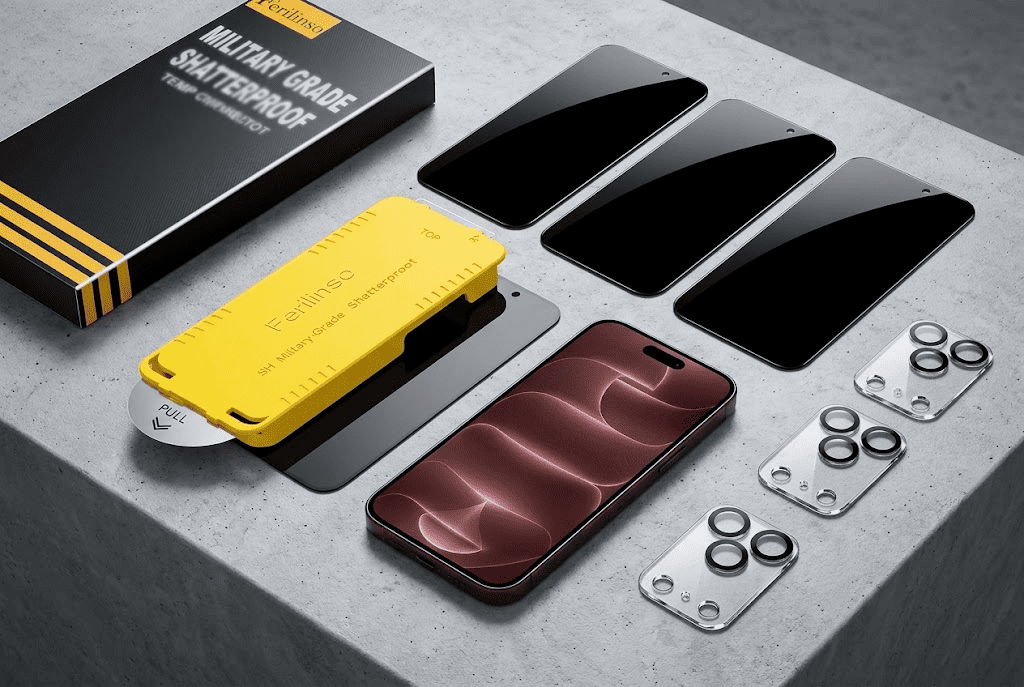
The Ferilinso Privacy Screen Protector for iPhone 18 Pro is designed for people who want both screen protection and additional privacy.
Unlike a standard clear protector, a privacy screen protector limits viewing angles. This helps reduce the chance that people sitting nearby can easily see what is displayed on your phone.
This can be useful when using your iPhone in public places such as:
- Coffee shops
- Airports
- Public transportation
- Offices
Key features include:
- Privacy viewing design
- 9H hardness tempered glass
- 3-pack package
- Case-friendly design
- Bubble-free installation design
- Camera lens protectors included
At around $6.85, it provides additional privacy features while keeping the cost low.
The trade-off with privacy protectors is that viewing angles can feel different compared with regular clear glass. However, for people who often use their phones around others, the added privacy can be worth it.
Tips for Getting More From Apple Intelligence
Apple Intelligence becomes more useful when you make it part of your normal workflow.
Try these habits:
- Use Writing Tools when editing messages or documents.
- Ask Siri follow-up questions instead of restarting every request.
- Use natural language when searching photos.
- Experiment with image creation features.
- Keep your software updated for new improvements.
AI features usually become more valuable when they save small amounts of time repeatedly.
Final Thoughts
Apple Intelligence is not designed to completely change how you use your iPhone or Mac. Instead, it adds helpful features throughout the system that make everyday tasks faster and easier.
On iPhone, it can improve writing, photos, Siri, and notifications. On Mac, it becomes especially useful for productivity tasks like editing documents, managing information, and improving communication.
To get the best experience, start by understanding the features you will actually use instead of trying everything at once.
If you are protecting a device you rely on every day, the Ailun Screen Protector is a simple choice for affordable everyday protection. If privacy matters more, the Ferilinso Privacy Screen Protector adds an extra layer of protection when using your iPhone in public.
Apple Intelligence is still developing, but its biggest advantage is that it works quietly in the background, helping you complete everyday tasks with less effort.