Choosing between an inkjet and a laser printer is not as simple as picking the cheaper option. The right choice depends on how often you print, what you print, and what matters most to you: color quality, speed, running costs, or convenience.
Affiliate Disclaimer
This website participates in affiliate programs. We may earn a commission
when you purchase products through links on this page, at no additional
cost to you. Our recommendations are based on independent research and
honest opinions.
Inkjet printers have traditionally been the better choice for photos and color-heavy documents, while laser printers have been popular for fast, high-volume office printing. However, printer technology has changed. Modern ink tank printers like Epson EcoTank models have reduced many of the old complaints about inkjet printers, especially expensive cartridge replacements.
In this guide, I’ll explain the real differences between inkjet and laser printers in 2026, where each type performs best, and which one makes more sense for your home or small office. I’ll also look at two Epson EcoTank models that represent the current generation of cartridge-free inkjet printers.
How Inkjet and Laser Printers Work
Before choosing a printer, it helps to understand how these two technologies are different.
Inkjet printers work by spraying tiny droplets of liquid ink onto paper. Because they can mix colors precisely, they are commonly used for photos, graphics, and documents where color accuracy matters.
Laser printers work differently. They use toner powder, a drum unit, and heat to transfer text and images onto paper. This process is faster and is especially effective for printing large amounts of text.
The basic difference:
- Inkjet printers: Better for color, photos, and mixed home use.
- Laser printers: Better for speed, text-heavy printing, and high-volume workloads.
Neither technology is automatically better. The best choice depends on your printing habits.
Print Quality: Inkjet vs Laser
Print quality is one of the biggest differences between these two printer types.
Inkjet printers usually have an advantage when printing:
- Photos
- Color graphics
- Marketing materials
- Documents with detailed images
The liquid ink allows smoother color transitions, which is why photographers and creative professionals often prefer inkjet technology.
Laser printers usually excel at:
- Sharp text
- Business documents
- Reports
- Forms and spreadsheets
A good laser printer can produce very crisp text, especially for documents that contain mostly black-and-white content.
For everyday home use, the difference may not matter much. But if you regularly print photos, school projects, presentations, or colorful documents, inkjet printers often make more sense.
Speed and Volume: Where Laser Printers Win
Laser printers have traditionally been the choice for offices because they are designed for speed.
They can usually handle:
- Large document batches
- Frequent printing
- High monthly page volumes
Inkjet printers are generally slower, especially when producing high-quality color prints. However, modern ink tank models have improved significantly compared with older cartridge-based inkjet printers.
If you only print a few pages every week, speed is rarely a major concern. If you print hundreds of pages every month, printer speed becomes much more important.
Ink Cost vs Toner Cost
The cost of printing goes beyond the printer itself. Consumables often determine the real long-term expense.
Traditional inkjet printers have a reputation for expensive ink cartridges. A printer may seem affordable at first, but replacement cartridges can become costly over time.
This is why refillable ink tank printers have become popular. Instead of replacing cartridges, you refill the printer with bottles of ink.
Benefits of ink tank systems:
- Lower cost per page
- Less frequent refilling
- Easier monitoring of ink levels
- Better value for frequent color printing
Laser printers use toner cartridges, which generally last longer than traditional ink cartridges. This makes them attractive for people who print large amounts of text.
Maintenance and Reliability
Maintenance is another important factor.
Inkjet printers can experience issues if they sit unused for long periods. The ink in the print head can dry, which may require cleaning cycles.
Laser printers usually handle periods of inactivity better because toner does not dry out in the same way.
However, modern ink tank printers have improved. For many home users who print regularly, maintenance is not a major problem.
A few habits help keep any printer working well:
- Use the printer occasionally instead of leaving it unused for months.
- Use recommended paper types.
- Keep the printer in a clean, dry area.
- Follow maintenance instructions when needed.
Which Printer Is Better for Home Use?
For most homes, the decision comes down to what you print.
An inkjet printer is usually better if you print:
- Family photos
- School assignments
- Color documents
- Creative projects
- Occasional scans and copies
A laser printer may be better if you mainly print:
- Black-and-white documents
- Work reports
- Invoices
- Large text files
Many home users today choose ink tank printers because they provide the flexibility of color printing without the traditional cartridge costs.
Which Printer Is Better for Small Offices?
Small offices often need a printer that can handle different tasks.
A laser printer may be the better option for offices that mainly print documents all day. The speed and toner efficiency can make a noticeable difference.
However, an ink tank all-in-one printer can also work well for small offices that need:
- Color documents
- Scanning
- Copying
- Occasional printing
- Lower running costs
The right choice depends on your monthly printing volume and whether color printing is important.
Why Epson EcoTank Changed the Inkjet Conversation
For years, one of the biggest complaints about inkjet printers was expensive cartridges. Epson’s EcoTank lineup changed that by replacing traditional cartridges with refillable ink tanks.
Instead of purchasing small cartridges repeatedly, EcoTank printers use larger ink bottles that can last much longer.
This approach makes inkjet printers more practical for people who want:
- Affordable color printing
- Lower long-term ink costs
- Less frequent refilling
- A home printer that handles multiple tasks
Two Epson EcoTank models stand out for different types of users: the ET-2803 for everyday home printing and the ET-4800 for people who need more office-focused features.
1
Epson EcoTank ET-2803 Wireless Color All-in-One Supertank Printer
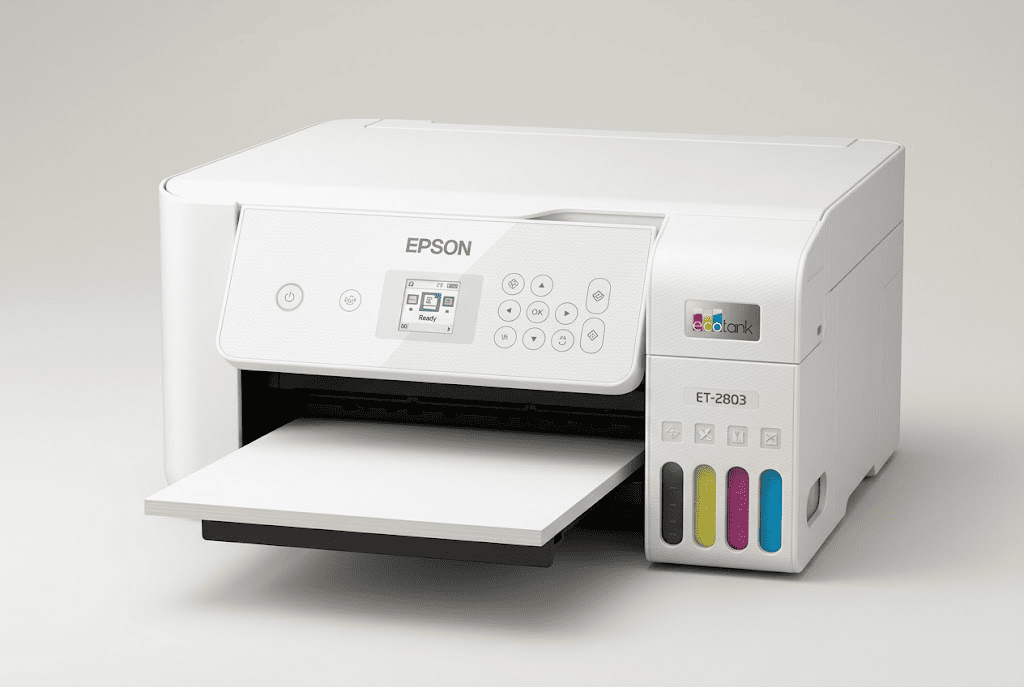
The Epson EcoTank ET-2803 Wireless Color All-in-One Supertank Printer is designed for home users who want an affordable color printer without dealing with traditional ink cartridges.
This model combines printing, scanning, and copying in one compact device. It is built around Epson’s cartridge-free EcoTank system, which uses refillable ink tanks instead of standard cartridges.
For everyday home printing, this approach makes a lot of sense. You can handle documents, school projects, recipes, basic photos, and other household printing needs while avoiding frequent cartridge replacements.
Key features include:
- Cartridge-free EcoTank ink system
- Wireless printing support
- Print, scan, and copy functions
- Borderless photo printing
- Apple AirPrint support
- Up to 10 pages per minute printing speed
At around $199.99, the ET-2803 costs more upfront than many basic cartridge printers. However, the value comes from the refillable ink system and lower ongoing ink expenses.
This printer is best suited for homes that need a little bit of everything. It is not designed for heavy office printing, but it works well for everyday tasks where convenience and affordable color printing matter.
If you want a simple home printer that can handle documents, photos, and occasional scanning without the frustration of expensive cartridges, the Epson EcoTank ET-2803 is a practical option.
2
Epson EcoTank ET-4800 Wireless Color All-in-One Supertank Printer
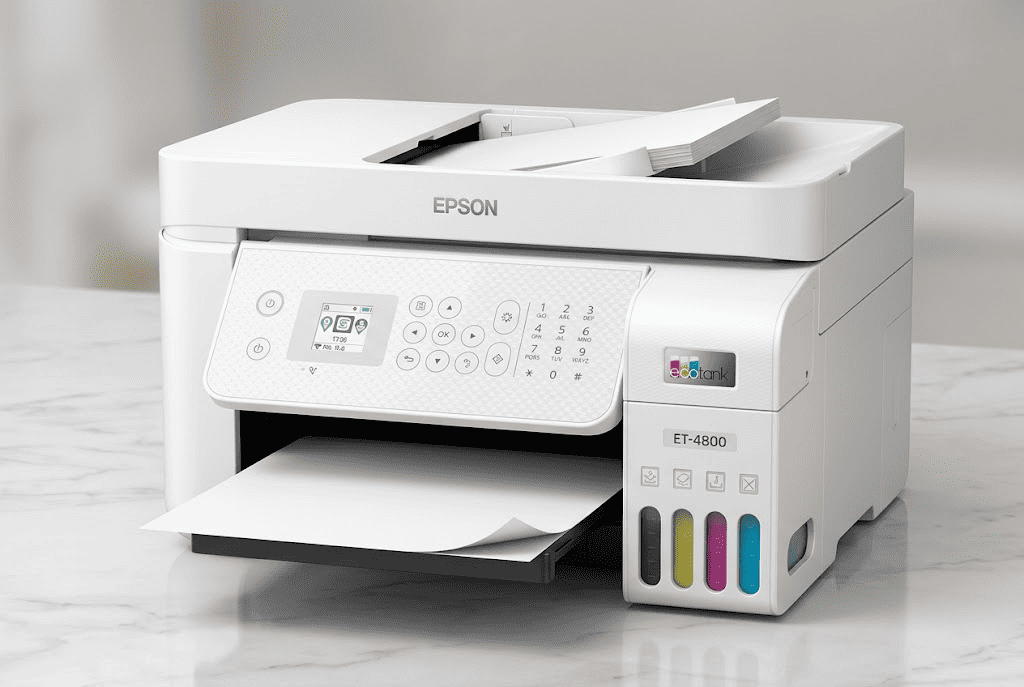
The Epson EcoTank ET-4800 Wireless Color All-in-One Supertank Printer is designed for people who need more than basic home printing. It adds office-focused features while keeping the same cartridge-free EcoTank system.
Like the ET-2803, the ET-4800 can print, scan, and copy. However, it also includes fax functionality, an automatic document feeder, and Ethernet connectivity, making it better suited for home offices and small business environments.
The automatic document feeder is especially useful if you regularly scan or copy multiple pages. Instead of placing each page manually on the scanner glass, you can process a stack of documents more efficiently.
Important features include:
- Cartridge-free EcoTank ink system
- Print, scan, copy, and fax functions
- Automatic document feeder (ADF)
- Ethernet connectivity
- Wireless printing
- Up to 10 pages per minute printing speed
At around $297.85, the ET-4800 costs more than the ET-2803 because of the additional features.
This model makes more sense for someone who works from home, manages documents regularly, or needs a printer that can handle both personal and professional tasks.
The print speed is not designed for a busy office with constant large print jobs, but for a home office or small business, it provides a useful combination of flexibility and lower ink costs.
If you need a printer that can do more than basic printing, the Epson EcoTank ET-4800 offers the extra features that make daily document work easier.
Inkjet or Laser Printer: What Should You Buy in 2026?
The right printer depends on your actual needs, not just the technology name.
Choose an inkjet printer if:
- You print color documents regularly.
- You want to print photos.
- You need scanning and copying at home.
- You prefer lower-cost color printing through an ink tank system.
Choose a laser printer if:
- You mainly print black-and-white documents.
- You print large volumes frequently.
- You need fast document output.
- You want a printer that can sit unused for longer periods.
For many households in 2026, modern ink tank printers have become a strong middle ground. They provide the color advantages of inkjet technology while reducing the biggest historical weakness: expensive ink replacements.
Final Thoughts
The inkjet vs laser printer debate is less straightforward than it used to be. Laser printers still make sense for high-volume document printing, but modern ink tank printers have changed what people expect from home printing.
For most families and everyday home users, the Epson EcoTank ET-2803 offers the right balance of affordability, color printing, and convenience. It handles common printing tasks without the ongoing cost frustration of traditional cartridges.
For people working from home or running a small office, the Epson EcoTank ET-4800 makes more sense because of features like the automatic document feeder, fax support, and Ethernet connectivity.
The best printer is the one that matches how you actually print. If you need color flexibility and affordable operation, a modern ink tank printer is often the smarter choice. If your priority is speed and heavy document output, a laser printer may still be the better fit.