Your Android phone is probably doing far more with AI than you realize. Features such as Google Lens, Magic Eraser, Circle to Search, live transcription, smart text suggestions, and AI-powered photo tools can quietly save you time without requiring you to install another app.
Affiliate Disclaimer
This website participates in affiliate programs. We may earn a commission
when you purchase products through links on this page, at no additional
cost to you. Our recommendations are based on independent research and
honest opinions.
The catch is that Android features vary by phone, Android version, manufacturer, and region. A Samsung Galaxy, Google Pixel, and other Android phones may offer different AI tools, so you may already have access to some of these features without knowing where to find them.
Here are seven AI features worth checking before you download another productivity app or buy a new gadget.
1. Circle to Search Can Identify Almost Anything on Your Screen
Circle to Search is one of the easiest AI features to overlook because it does not require you to open a separate application. On supported Android phones, you can activate it while viewing something on your screen and search for an object, product, place, or piece of information without manually typing what you see.
Say you are scrolling through Instagram and notice a pair of headphones you like. Instead of taking a screenshot and trying to describe the headphones in Google Search, you can use Circle to Search and select the item directly on your screen.
It Is Useful for More Than Shopping
The feature can also help when you encounter something unfamiliar.
You might circle a plant in a photo, select a landmark, translate text, or ask a follow-up question about something shown on your display. Google has continued adding AI capabilities to Circle to Search, including more ways to interact with information without leaving the current screen.
That makes it particularly useful when you want an answer quickly but do not want to interrupt what you are doing.
2. Google Lens Can Turn Your Camera Into a Search Tool
Google Lens is another feature that many Android owners use occasionally without realizing how much it can actually do.
Point your camera at something, and Lens can analyse the image to help identify objects, translate text, copy information, search for similar items, and perform other visual searches. You can also use Lens with existing photos rather than pointing your camera at something in real time.
Try It With Everyday Problems
Google Lens becomes much more useful when you stop thinking of it as simply an object identifier.
For example, you can use it to:
- Copy text from a printed document.
- Translate a sign or menu.
- Identify a plant or object.
- Search for a product you see in person.
- Extract information from an image.
- Search for visually similar items.
- Understand something you cannot easily describe with words.
The best part is that the camera becomes the starting point. You do not always need to know what something is before searching for it.
3. AI Can Clean Up Your Photos After You Take Them
Modern Android phones increasingly use AI to fix problems in photos after you have already pressed the shutter.
Depending on your phone, you may have tools that can remove unwanted objects, adjust parts of an image, improve composition, or make other changes without requiring traditional photo editing skills.
Google’s Magic Eraser is one of the best-known examples. Instead of opening a complicated editing program and manually working around an unwanted object, you can select it and let the software handle much of the process.
This Is Especially Handy for Everyday Photos
You do not need to be a professional photographer to benefit from this.
Maybe someone walked through the background of an otherwise great vacation photo. Perhaps there is a distracting object on a table, or you simply want to clean up the frame before sharing it.
AI photo editing can handle these small problems in seconds.
There is still a limit, though. AI does not magically recreate information that was never captured. Complicated backgrounds, faces, hands, and fine details can sometimes produce strange results, so it is worth checking the edited image before sharing it.
Your Phone Can Also Make Everyday Reading Easier
AI is not only about generating images or answering questions. Some of the most practical features help you deal with information that appears throughout your day.
Your phone can recognise text, understand speech, summarise information, and help you move content from the physical world into digital form.
That becomes especially useful when you are working, studying, travelling, or simply trying to avoid typing something manually.
4. Live Transcription Can Turn Speech Into Text
If your Android phone supports live transcription or an equivalent speech recognition feature, you can use AI to convert spoken words into text in real time.
This can be useful during conversations, meetings, lectures, interviews, or situations where you simply need to follow spoken information more easily.
Instead of trying to remember everything someone says, you can let your phone process the speech and provide a written version.
It Can Save More Time Than You Expect
Think about how often you receive information verbally.
A colleague might explain several instructions. Someone might give you an address over the phone. You could be listening to a presentation while trying to take notes.
Speech recognition can reduce the amount of information you have to type manually.
On supported devices, Google’s Recorder app can also transcribe recordings and provide additional tools for working with recorded conversations. Availability and features vary by device and language, so check what your particular Android phone supports.
5. Your Keyboard Can Help Rewrite What You Type
AI is also hiding inside something you probably use dozens of times every day: your keyboard.
Depending on the keyboard and phone you use, AI writing features can help rewrite text, adjust the tone of a message, correct grammar, or make a sentence clearer.
This is particularly useful when you know what you want to say but cannot quite find the right wording.
You Do Not Need to Write Everything From Scratch
Imagine you have typed a quick message to a colleague, but it sounds too casual. An AI writing tool can potentially help make it more professional without requiring you to copy the entire message into a separate chatbot.
The same idea works in reverse. A complicated sentence can be made simpler, while a formal message can be made more conversational.
The important thing is to treat these tools as writing assistance rather than handing over your entire communication style to AI. Read the final version before sending it, especially when the message contains important details.
A Small Accessory Can Make These Features Easier to Use
AI features may be digital, but the way you physically use your phone still matters. If you spend a lot of time using your phone for reading, photography, video calls, navigation, or hands-free tasks, a better grip or viewing position can make those interactions more comfortable.
That is where a simple phone accessory can fit naturally into the picture.
1
Doflyesky Magnetic Phone Ring Holder with MagSafe
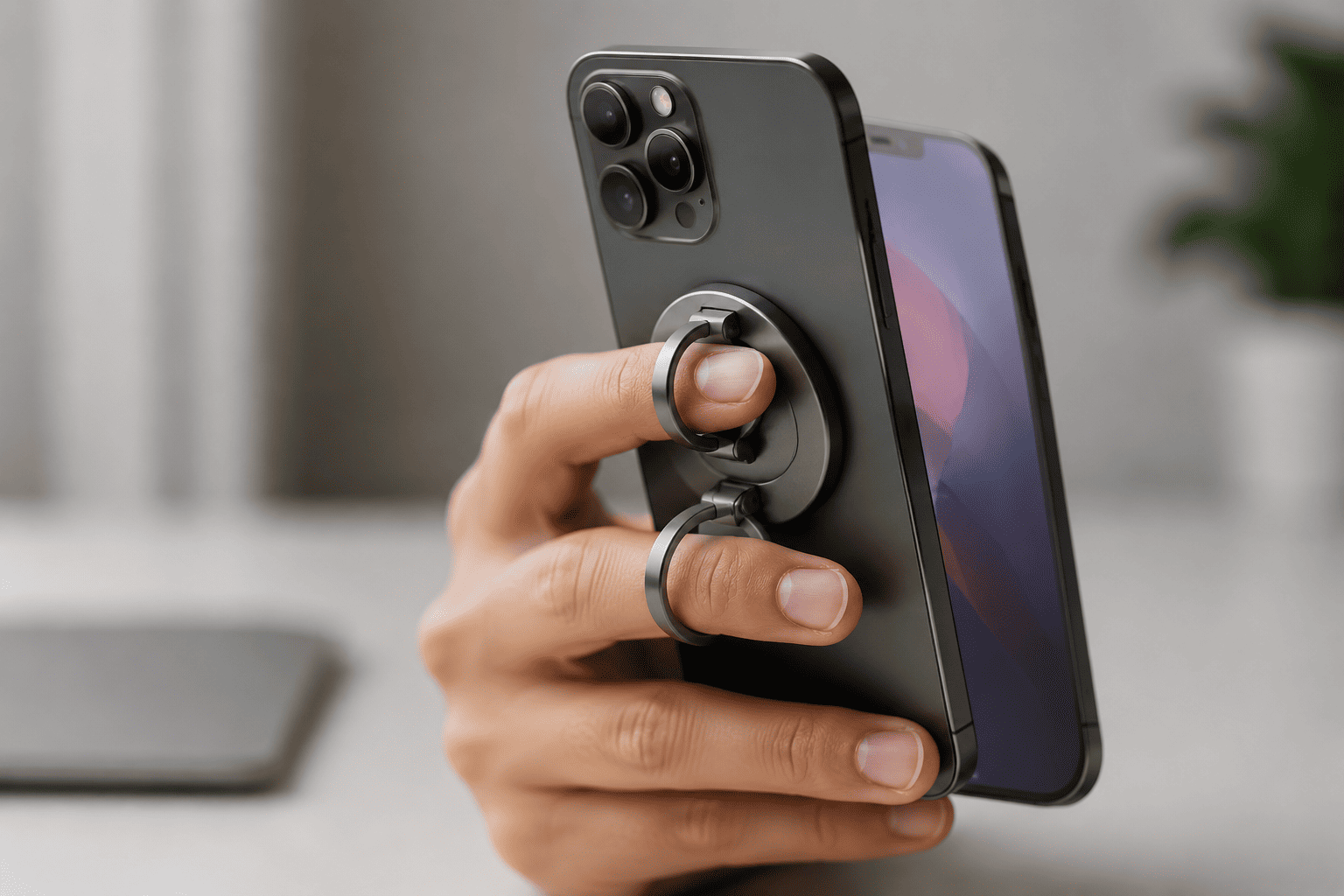
The Doflyesky Magnetic Phone Ring Holder with MagSafe is a small accessory that can make handling a large smartphone more convenient.
The listing describes a magnetic, removable phone grip with a double-adjustable finger ring and compatibility with magnetic car mounts. At the supplied price of $17.99, it is aimed at people who want more control over their phone without permanently attaching a traditional grip.
Why It Fits an AI-Focused Phone Setup
AI features often encourage you to interact with your phone in different ways. You might hold the phone up while using Lens, keep it in your hand while searching with Circle to Search, or position it for a video call or hands-free activity.
A ring grip can make those situations easier to manage, particularly if you have a larger phone.
The provided listing shows a 4.1-star rating from 6,500 ratings and more than 3,000 purchases in the past month. Those numbers suggest plenty of interest, but the most important consideration is whether the magnetic connection and grip style work with your particular phone and case.
6. Your Phone Can Summarize Information for You
One of the most useful AI abilities is summarisation.
Depending on your phone and the apps available on it, AI can help shorten long pieces of information into something easier to understand. This can be useful for messages, documents, web pages, notes, or other content.
Instead of reading every line immediately, you can get the main points first and then decide whether you need to go deeper.
Use Summaries as a Starting Point
This is especially helpful when you are dealing with a large amount of information on a small screen.
For example, you might receive a long message containing several instructions. An AI summary can help you understand the main points quickly, while you can return to the original message when you need exact details.
That last part matters. AI summaries can miss context or misunderstand something, so they are better for getting the gist than replacing the original information entirely.
7. Your Phone Can Help You Understand What Is on Your Screen
The final feature is one of the most useful because it brings several AI capabilities together. On supported Android phones, Gemini can understand information on your screen and help you work with it without forcing you to manually copy everything into another app.
You might be reading an article, looking at an image, reviewing a document, or watching something and want more information. Instead of stopping what you are doing, you can ask Gemini about the content in front of you.
Screen Awareness Can Save You Several Steps
This becomes particularly useful when you are researching something.
For example, you could ask Gemini to explain a section of text in simpler language, summarise what you are reading, or help you understand an unfamiliar topic. You can also combine information from what is on your screen with a follow-up request.
The exact capabilities depend on your Android phone and the version of Gemini available to you, but the overall idea is simple: your phone can understand more of what you are already looking at.
A Phone Stand Can Make These AI Features More Convenient
Once you start using your phone for reading, video calls, AI conversations, recipes, tutorials, or reference material, constantly holding it can become annoying.
A simple desk stand can make a surprising difference, especially if you work at a computer and keep your phone beside you.
2
LISEN Cell Phone Stand Phone Holder for Desk

The LISEN Cell Phone Stand is a straightforward option for keeping your Android phone upright on a desk.
The listing describes it as an adjustable phone holder that can also accommodate devices such as the Nintendo Switch and iPad. At the supplied price of $9.97, it is a relatively inexpensive accessory for anyone who regularly keeps their phone beside a computer or workspace.
Where It Makes Sense
A stand becomes useful when your phone is doing something that does not require you to hold it.
You could keep your phone upright while following an AI-generated explanation, watching a tutorial, reading a recipe, joining a video call, or using your phone as a second screen for reference material.
The supplied listing has a 4.5-star rating from more than 71,000 ratings and shows more than 9,000 purchases in the past month. That gives you a useful indication of its popularity, although the important thing is whether its size and adjustment range suit your particular phone and case.
How to Find AI Features on Your Android Phone
The biggest problem with these features is that Android does not have one universal menu containing every AI tool.
Samsung adds its own Galaxy AI features. Google Pixel phones have their own set of Google features. Other Android manufacturers may offer different tools depending on the phone model and software version.
So the best approach is to check the features already available on your phone instead of assuming you need a new application.
Start With These Places
Look through:
- Your Google app and Gemini app
- Camera and photo editing tools
- Google Lens
- Google Photos
- Your keyboard settings
- Accessibility settings
- Google Assistant or Gemini settings
- Your phone manufacturer’s AI or smart features
- Search and screen interaction tools
Also keep your phone updated. Some AI capabilities are introduced through software updates rather than new hardware.
Are AI Features Worth Using?
Yes, but only when they solve an actual problem.
You do not need to use every AI feature simply because your phone has it. If you rarely edit photos, Magic Eraser may not matter much to you. If you do not use voice transcription, there is no reason to build your routine around it.
The useful features are the ones that remove small frustrations from things you already do.
Start With the Features That Save You Time
If you want to try a few without changing your routine, start with these:
For searching: Try Circle to Search or Google Lens when you see something you cannot easily describe.
For photos: Try AI editing tools when you have an otherwise good picture with an unwanted object or distraction.
For writing: Try your keyboard’s AI tools when you need to rewrite or improve a message.
For speech: Try transcription when you need to capture spoken information without typing everything manually.
For information: Try Gemini when you need a quick explanation or summary of something you are already reading.
These are small changes, but they can add up over time.
Your Android Phone May Be Smarter Than You Think
The interesting thing about AI on Android is that you do not necessarily need a new phone to start using it.
Some of the most useful AI features are already built into apps and services you may have been ignoring. Google Lens can help you understand the world through your camera, Circle to Search can make screen searches easier, AI editing can fix everyday photo problems, and transcription can turn spoken words into useful text.
The experience varies considerably between Android phones, so do not assume that every feature listed here will appear on your device. Check your phone model, Android version, and the latest app updates to see what is actually available.
The Bottom Line
Your Android phone is probably capable of more AI-powered tasks than you are currently using.
Circle to Search and Google Lens are great starting points if you regularly search for things you see around you. AI photo editing is useful when you want to clean up pictures without spending time in a complicated editor. Transcription and AI writing tools can save time when you work with conversations, notes, or messages, while screen-aware AI and Gemini can help you understand information without constantly switching between apps.
And if you spend a lot of time using these features at your desk, the LISEN Cell Phone Stand is a simple $9.97 accessory that can keep your phone visible and accessible. If you prefer holding your phone while using AI tools, the Doflyesky Magnetic Phone Ring Holder provides another practical way to get a more secure grip.
You do not need to become an AI power user overnight. Start with one or two features that solve a problem you already have, and you may quickly wonder how you managed without them.