A good wireless mouse can make a bigger difference than most people expect. If you spend several hours a day answering emails, working with spreadsheets, editing documents, or switching between multiple apps, the right mouse helps you work faster while keeping your hand more comfortable. On the other hand, a cheap or poorly designed mouse can leave your wrist feeling tired before the workday is over.
Affiliate Disclaimer
This website participates in affiliate programs. We may earn a commission
when you purchase products through links on this page, at no additional
cost to you. Our recommendations are based on independent research and
honest opinions.
After comparing some of the most popular wireless mice available today, I think the Logitech M720 Triathlon is the best overall choice for productivity. It combines excellent comfort, multi-device support, programmable buttons, and outstanding battery life at a price that feels well worth it. That said, it isn’t the perfect fit for everyone. If you’re shopping on a tight budget, need a rechargeable mouse, or simply have larger hands, there are better options depending on how you work.
In this guide, I’ll walk you through the best wireless mice for work in 2026, explain what makes each one stand out, and help you pick the one that fits your desk, your workflow, and your budget.
Quick Comparison: Best Wireless Mice for Productivity and Work
| Product | Best For | Battery | Approx. Price |
|---|---|---|---|
| Logitech M720 Triathlon Multi-Device Wireless Mouse | Best Overall | Up to 2 Years | Around $40 |
| TECKNET Wireless Bluetooth Mouse | Best Budget | Rechargeable | Around $20 |
| Logitech M510 Wireless Mouse | Best Ergonomics | Up to 24 Months | Around $28 |
| XBG B15pro Wireless Bluetooth Mouse | Best Rechargeable | USB-C Rechargeable | Around $26 |
| Logitech Signature M550 L Wireless Mouse | Best for Large Hands | Up to 2 Years | Around $30 |
1
Logitech M720 Triathlon Review: Best Overall Wireless Mouse for Productivity

If your workday involves jumping between documents, spreadsheets, web browsers, and video calls, I think the Logitech M720 Triathlon Multi-Device Wireless Mouse is one of the easiest recommendations I can make. At around $40, it delivers premium features without asking you to spend premium money.
What makes this mouse special isn’t flashy RGB lighting or extremely high DPI numbers. Instead, it focuses on the things that actually improve your workday. The ergonomic shape fits naturally in your hand, the buttons feel responsive without being loud, and the scroll wheel is excellent for moving through long documents or web pages. If you’re spending eight hours at your desk, those little details matter.
The multi-device support is where the M720 really separates itself from many competitors. It can stay paired with up to three devices through Bluetooth or Logitech’s Unifying Receiver, letting you switch between them almost instantly. If you use both a work laptop and a personal computer, this feature alone can make your workflow noticeably smoother.
Another feature I appreciate is the six programmable buttons. You can customize them to launch applications, switch tabs, copy and paste, or perform other shortcuts you use every day. It takes only a few minutes to set up, but it can save a surprising amount of time over the course of a week.
Battery life is another strong point. Logitech estimates up to two years from a single AA battery, and in real-world use, it’s one of those devices you rarely have to think about. That reliability is exactly what you want from a productivity mouse.
If you want one wireless mouse that can comfortably handle office work, remote work, multitasking, and everyday computing, I think this is the best all-around option on the market.
2
TECKNET Wireless Bluetooth Mouse Review: Best Budget Productivity Mouse

If you don’t want to spend more than $20 but still want a mouse that feels modern and comfortable, the TECKNET Wireless Bluetooth Mouse is easily one of the best values available today.
Despite its affordable price, it doesn’t feel like a basic budget mouse. It supports both Bluetooth and a 2.4GHz USB receiver, so connecting it to almost any laptop or desktop is simple. Whether you’re using Windows, macOS, or another compatible device, setup only takes a minute or two.
One feature I really like is the rechargeable battery. Instead of replacing disposable batteries every few months, you simply recharge them using a USB cable. If you’re trying to reduce clutter on your desk or avoid buying batteries, that’s a nice bonus.
The six adjustable DPI settings make it easy to fine-tune cursor speed depending on what you’re doing. You can slow it down for detailed spreadsheet work or speed it up when you’re moving between multiple monitors. The quiet-click buttons are another thoughtful touch, especially if you work in a shared office or spend a lot of time on video calls where loud mouse clicks can become distracting.
Comfort is surprisingly good for a mouse in this price range. The ergonomic shape provides decent palm support, while the side buttons make navigating web pages and documents a little quicker. It isn’t quite as refined as Logitech’s higher-end models, but it’s much closer than the price would suggest.
If you’re looking for an affordable wireless mouse that doesn’t cut corners where it matters most, the TECKNET delivers outstanding value and is an easy recommendation for students, remote workers, and everyday office use.
3
Logitech M510 Review: Best Ergonomic Wireless Mouse for Everyday Office Work

If comfort is at the top of your priority list, the Logitech M510 Wireless Mouse deserves a close look. Even though it’s been around for a while, it’s still one of Logitech’s most dependable productivity mice, and that’s a big reason why so many people continue to recommend it.
At around $28, the M510 feels noticeably more comfortable than many compact wireless mice. Its sculpted shape supports your palm well, while the soft rubber side grips make it easier to hold during long work sessions. If you’re spending six to ten hours a day at your desk, that extra comfort can make a real difference.
The laser-grade sensor tracks smoothly on most desk surfaces, whether you’re editing documents, browsing the web, or working across multiple monitors. It isn’t designed for competitive gaming, but that’s not really its purpose. For office work, it feels accurate and dependable.
One thing I really appreciate is the battery life. Logitech estimates up to 24 months from two AA batteries, and in everyday use, it lives up to its reputation. It’s one of those devices you almost forget about because it simply keeps working.
The mouse also includes seven buttons, including convenient back and forward buttons for web browsing. Those extra controls may seem minor at first, but once you get used to them, navigating through files and websites becomes much quicker.
If your biggest priority is all-day comfort and reliable performance without spending much money, I think the M510 remains one of the safest purchases you can make.
4
XBG B15pro Review: Best Rechargeable Mouse for Multi-Device Work
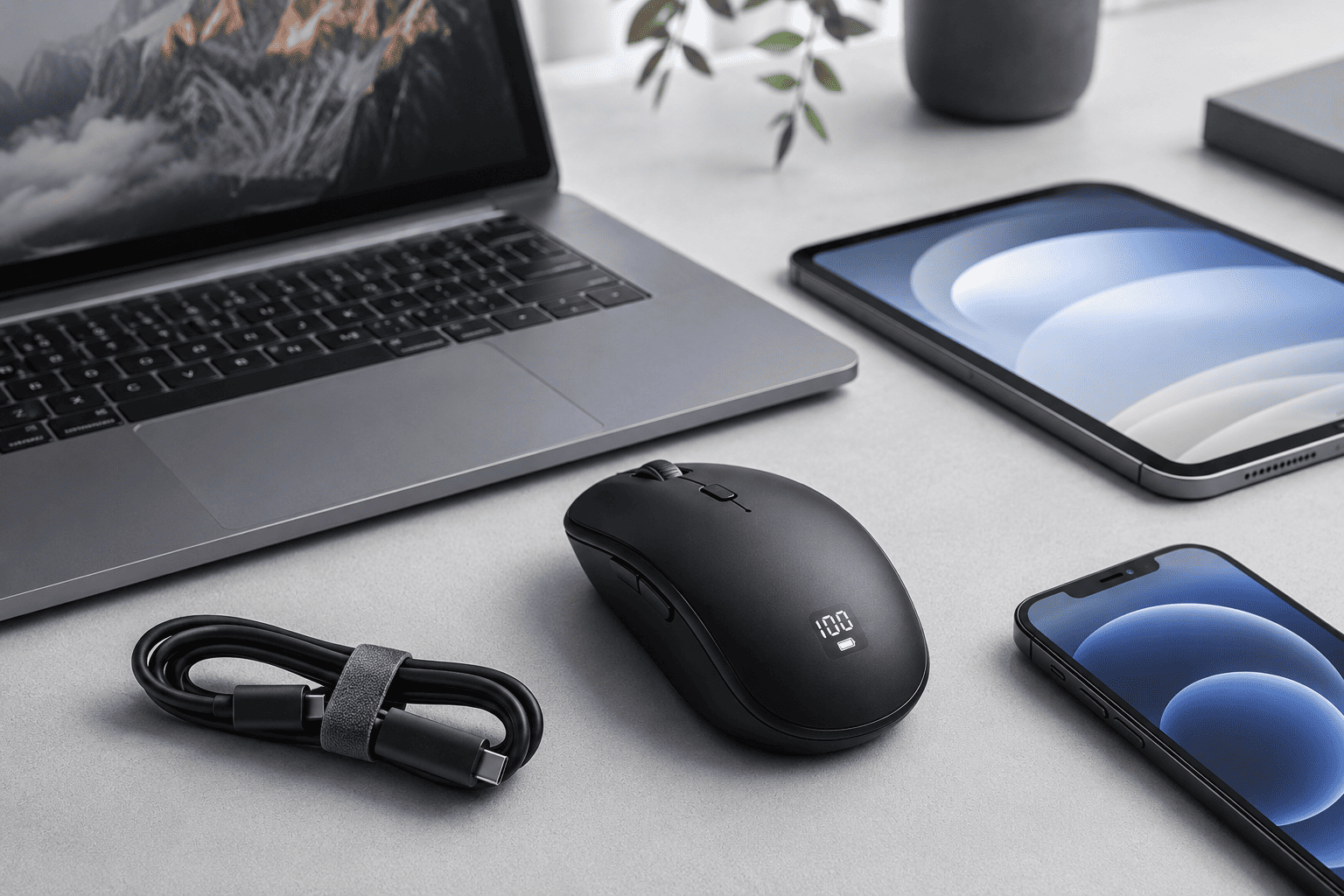
The XBG B15pro Wireless Bluetooth Mouse is a newer option that packs in features you don’t usually find around the $26 price point. If you like modern gadgets with a few extra conveniences, this one is definitely worth considering.
The first thing you’ll notice is the built-in LED display. Instead of guessing how much battery you have left, the screen gives you a quick look at battery status and connection information. It’s a small feature, but it’s surprisingly useful because you won’t be caught with a dead mouse in the middle of your workday.
Another highlight is its tri-mode connectivity. You can connect through Bluetooth 5.0, Bluetooth 4.0, or the included 2.4GHz USB receiver. That flexibility makes it easy to pair with laptops, desktops, tablets, and even some mobile devices without constantly reconnecting everything.
The ergonomic shape fits comfortably in the hand, and the silent buttons are perfect if you work in a quiet office, library, or shared workspace. The clicks still feel responsive, but they produce very little noise, which your coworkers will probably appreciate.
USB-C charging is another welcome upgrade. Most people already have USB-C cables on their desks for phones or laptops, so charging the mouse is simple and convenient. Since it’s rechargeable, you’ll never need to buy replacement batteries.
While the sensor isn’t aimed at graphic designers or gamers who need extremely high precision, it performs very well for everyday office work, web browsing, spreadsheets, presentations, and remote work.
If you want a feature-rich wireless mouse without spending premium money, the XBG B15pro offers a lot more than you’d expect at this price.
5
Logitech Signature M550 L Review: Best Wireless Mouse for Large Hands

If you’ve ever felt like most wireless mice are simply too small, the Logitech Signature M550 L Wireless Mouse could be exactly what you’re looking for. Logitech designed this version specifically for people with larger hands, and that extra size makes a noticeable difference during long work sessions.
Priced at around $30, the M550 L strikes a nice balance between simplicity and comfort. It doesn’t try to overwhelm you with dozens of programmable buttons or complicated software. Instead, it focuses on delivering a smooth, comfortable everyday experience.
One of the standout features is Logitech’s SilentTouch technology. The buttons feel satisfying to press, but they’re dramatically quieter than traditional mouse clicks. If you’re constantly on Zoom meetings or working in a quiet office, that’s something you’ll appreciate every single day.
The SmartWheel scroll wheel is another thoughtful addition. It automatically switches between precise scrolling and faster scrolling depending on how you move it. When you’re reading a long report or browsing a lengthy spreadsheet, it saves both time and effort.
Like several other Logitech productivity mice, the M550 L supports both Bluetooth and the Logi Bolt USB receiver, making it easy to connect to different laptops and desktops. Setup takes only a few moments, and the connection remains stable throughout the day.
Battery life is rated for up to two years, so maintenance is practically nonexistent. Replace the battery every couple of years, and you’re good to go.
If comfort is your biggest concern and you prefer a full-size mouse that supports your entire hand, I think the M550 L is one of the strongest options in its price range.
Final Recommendation
After spending time comparing these five wireless mice, here’s how I’d narrow down the decision.
Buy the Logitech M720 Triathlon if you want the best overall productivity mouse. Its multi-device support, programmable buttons, excellent ergonomics, and incredible battery life make it an easy recommendation for almost anyone who spends hours working on a computer.
Choose the TECKNET Wireless Bluetooth Mouse if you’re shopping on a budget. For around $20, it’s hard to beat the combination of rechargeable convenience, quiet clicks, Bluetooth support, and comfortable design.
Go with the Logitech M510 if all-day comfort matters most. Its larger ergonomic shape and dependable performance make it an excellent choice for office workers who spend long hours at their desks.
Pick the XBG B15pro if you prefer modern features like USB-C charging, tri-mode connectivity, and a built-in battery display. It offers impressive flexibility without costing much more than an entry-level mouse.
Choose the Logitech Signature M550 L if you have larger hands and want a quieter working experience. The SilentTouch buttons and comfortable full-size design make it one of the easiest mice to use throughout a full workday.
Conclusion
A wireless mouse is one of those tools you probably don’t think much about until you start using a really good one. Once you have a mouse that’s comfortable, responsive, and reliable, everyday work simply feels smoother. Whether you’re editing documents, managing spreadsheets, attending virtual meetings, or switching between multiple devices, the right mouse can quietly improve your productivity without getting in the way.
If I were buying one today, I’d still choose the Logitech M720 Triathlon. It offers the best mix of comfort, versatility, battery life, and productivity features at a price that’s reasonable for what you get. It’s the kind of mouse you can use every day for years without feeling like you need an upgrade.
That said, every mouse on this list has a clear purpose. The TECKNET is perfect if you’re watching your budget, the Logitech M510 is built for comfort, the XBG B15pro is packed with modern features, and the Logitech Signature M550 L is a great fit if most mice feel too small in your hand.
Before you make your decision, think about how you actually work. Do you switch between multiple computers? Do you prefer rechargeable devices? Do you spend eight or more hours at your desk every day? Once you answer those questions, picking the right wireless mouse becomes much easier, and you’ll end up with something that makes your workday more comfortable from the first click to the last.