A Ring Doorbell that suddenly stops working does not always mean the hardware has failed. In many cases, the problem comes down to power, a weak Wi-Fi connection, a setting inside the Ring app, or a temporary communication issue between the doorbell and your network.
Affiliate Disclaimer
This website participates in affiliate programs. We may earn a commission
when you purchase products through links on this page, at no additional
cost to you. Our recommendations are based on independent research and
honest opinions.
The good news is that most common Ring Doorbell problems can be checked at home without replacing anything. Below, I’ll walk you through the fixes I would try first, from basic power checks to Wi-Fi troubleshooting, Live View problems, missing alerts, motion detection, and chime issues. If your Ring is getting old or keeps failing after troubleshooting, I’ll also cover two alternatives worth considering.
Start With the Ring App Before Touching the Doorbell
Before removing screws, resetting the device, or changing your router settings, open the Ring app and look at Device Health.
This is one of the fastest ways to narrow down the problem because Ring shows several useful details in one place, including:
- Battery level or power source
- Whether the doorbell is online or offline
- Wi-Fi signal strength
- Network name
- Device information
- Power warnings on supported hardwired models
You can normally find it by opening the Ring app, selecting your doorbell, and opening the Device Health section. Ring also provides a reboot option there for compatible online devices.
If the doorbell appears online and has enough power, you can move past the basic hardware checks. If it shows offline, low battery, weak Wi-Fi, or a power warning, you already have a strong clue about where to start.
Ring Doorbell Has No Power
If your Ring Doorbell is completely unresponsive, power should be your first concern.
For a battery-powered model, check the battery percentage in Device Health. If the battery is very low or dead, charge it before spending time troubleshooting Wi-Fi or app settings. Ring says its battery-powered doorbells may take up to about 10 hours to fully charge, depending on the model and power source.
If it does not seem to charge properly, try another USB cable and a known working power source.
For a hardwired Ring Doorbell, check Device Health for a power warning. Wiring problems, an incompatible transformer, or an incompatible in-home chime can cause the doorbell to lose power, behave unpredictably, or stop working after someone presses the button.
Be careful with hardwired systems. If troubleshooting requires touching doorbell wiring or the transformer, turn off power at the breaker first. If you are not comfortable working with low-voltage wiring, this is a good point to call an electrician.
Ring Doorbell Offline or Not Connecting to Wi-Fi
Wi-Fi problems are probably the most common reason a Ring Doorbell appears to stop working even though the device itself is fine.
Go back to Device Health and look at Signal Strength, which Ring measures using RSSI. A signal between roughly 0 and -60 is considered strong. Once you get closer to -70 or lower, delays and connection problems become more likely.
If the connection is weak, try these first:
- Restart your home router.
- Confirm that your internet connection is actually working.
- Move the router closer to the front door if practical.
- Reduce large physical barriers between the router and doorbell.
- Consider a mesh Wi-Fi system if the front of your home has consistently poor coverage.
- Reconnect the Ring Doorbell to Wi-Fi through the Ring app.
Walls made from brick, concrete, metal, and some types of glass can have a surprisingly large effect on wireless performance. The connection may also become less reliable after moving your router or changing your internet provider.
If you recently changed your Wi-Fi name or password, the Ring Doorbell will need to be connected to the new network credentials.
During a fresh setup, keep your phone close to the doorbell, make sure the Ring app and phone software are current, and double-check the Wi-Fi password. Ring specifically recommends having the phone near the device during setup.
Ring Doorbell Live View Not Working
Sometimes notifications arrive normally, but Live View refuses to load, shows a black screen, or takes a long time to connect.
First, confirm that the doorbell shows as online. Then force-close the Ring app and reopen it. Ring recommends checking the device’s online status when Live View fails to load correctly.
A weak connection can also affect video more noticeably than basic notifications because streaming live video requires a stable connection in both directions.
If Live View still fails:
- Check Device Health for a poor Wi-Fi signal.
- Test your internet connection.
- Restart the Ring app.
- Restart your phone.
- Reboot the Ring Doorbell.
- Temporarily disable a VPN on your phone if you use one.
- Test Live View while your phone is connected to a different network.
If Live View works on cellular data but not your home Wi-Fi, the problem may be related to your local network rather than the doorbell itself.
Ring Doorbell Notifications Not Working
A doorbell can detect visitors correctly while your phone stays completely silent. When that happens, I would check settings before assuming motion detection has failed.
Inside the Ring app, confirm that Ring Alerts, Motion Detection, and Motion Alerts are enabled where appropriate. Ring also recommends confirming that the doorbell is online and that Do Not Disturb is not preventing alerts on your phone.
Then check your phone’s own notification settings. Make sure the Ring app has permission to show notifications and play sounds.
It is also worth checking whether you previously enabled an alert snooze or motion schedule and forgot about it. Those settings can make the doorbell seem unreliable even though it is following the rules you gave it.
Ring Doorbell Not Detecting Motion
If your Ring Doorbell records some visitors but completely misses others, the problem may be your motion settings rather than the camera.
Open Motion Settings and review your Motion Zones, sensitivity, and motion frequency. Ring lets you increase sensitivity when important activity is being missed and redraw Motion Zones so the doorbell watches the parts of your porch or walkway that actually matter.
Pay attention to how people approach your door. A poorly positioned zone may cover the street beautifully while missing someone walking close to the wall toward your entrance.
For battery-powered models, more aggressive motion settings can also increase battery consumption. There is usually a balance between catching every small movement and keeping the battery from needing constant charging.
Ring Doorbell Works, but the Indoor Chime Does Not
This issue is a little different because the Ring Doorbell itself may be working perfectly.
If your phone receives the alert and Live View works, check the In-home Chime Settings in the Ring app. Make sure the selected chime type matches your actual setup, such as mechanical or digital, and confirm that ringing the in-home chime is enabled on models that support it.
Compatibility matters here. Not every Ring Doorbell works with every traditional chime, and some newer wired models require a different chime arrangement.
If you use a separate Ring Chime, also confirm that it is linked to the correct doorbell inside the app. Ring allows Chime devices to be linked specifically for doorbell presses and motion alerts.
Ring Doorbell Battery Draining Too Fast
Battery life can vary dramatically from one house to another. A doorbell facing a busy sidewalk may wake up many more times each day than one facing a quiet porch.
Frequent motion events, repeated Live View sessions, weak Wi-Fi, cold weather, and an aging battery can all shorten the time between charges. Ring specifically notes that poor Wi-Fi may increase battery drain because the device repeatedly loses and re-establishes its connection.
If the battery suddenly starts draining faster than it used to, check:
- Wi-Fi signal strength
- Motion sensitivity
- Motion Zones
- Motion frequency
- Number of daily motion events
- Frequency of Live View use
- Battery age
Reducing unnecessary motion triggers can make a noticeable difference without making the doorbell much less useful.
Reboot Before You Reset
A reboot is one of the safest things to try when a Ring Doorbell behaves strangely.
If the doorbell is online, you may be able to reboot it directly through Device Health. Ring also says some battery models can be restarted by briefly removing the removable battery, while a wired device can be power-cycled through the breaker when appropriate.
I would try a reboot before performing a full factory reset.
A factory reset removes settings and forces you to set up the doorbell again, so it makes more sense as a later troubleshooting step. The exact reset procedure varies by Ring model, so use Ring’s instructions for your specific doorbell rather than assuming every setup button works the same way.
When Fixing the Ring Doorbell Stops Making Sense
Most connection and notification problems are worth troubleshooting. But there comes a point where repeatedly reconnecting an aging doorbell, dealing with a failing battery, or chasing inconsistent hardware becomes more frustrating than replacing it.
That is especially true if you were already thinking about changing how you store recordings or how much you spend on your doorbell system.
You do not necessarily need another Ring. There are plenty of video doorbells now, but I would narrow the list based on what bothered you about your old setup rather than buying something simply because it has a long feature list.
If avoiding another recurring fee matters most, the first option below makes more sense. If you want a more established smart security platform and the ability to install the doorbell with or without wiring, the second is the stronger fit.
1
BOIFUN Video Doorbell Camera: Best for Avoiding a Monthly Subscription
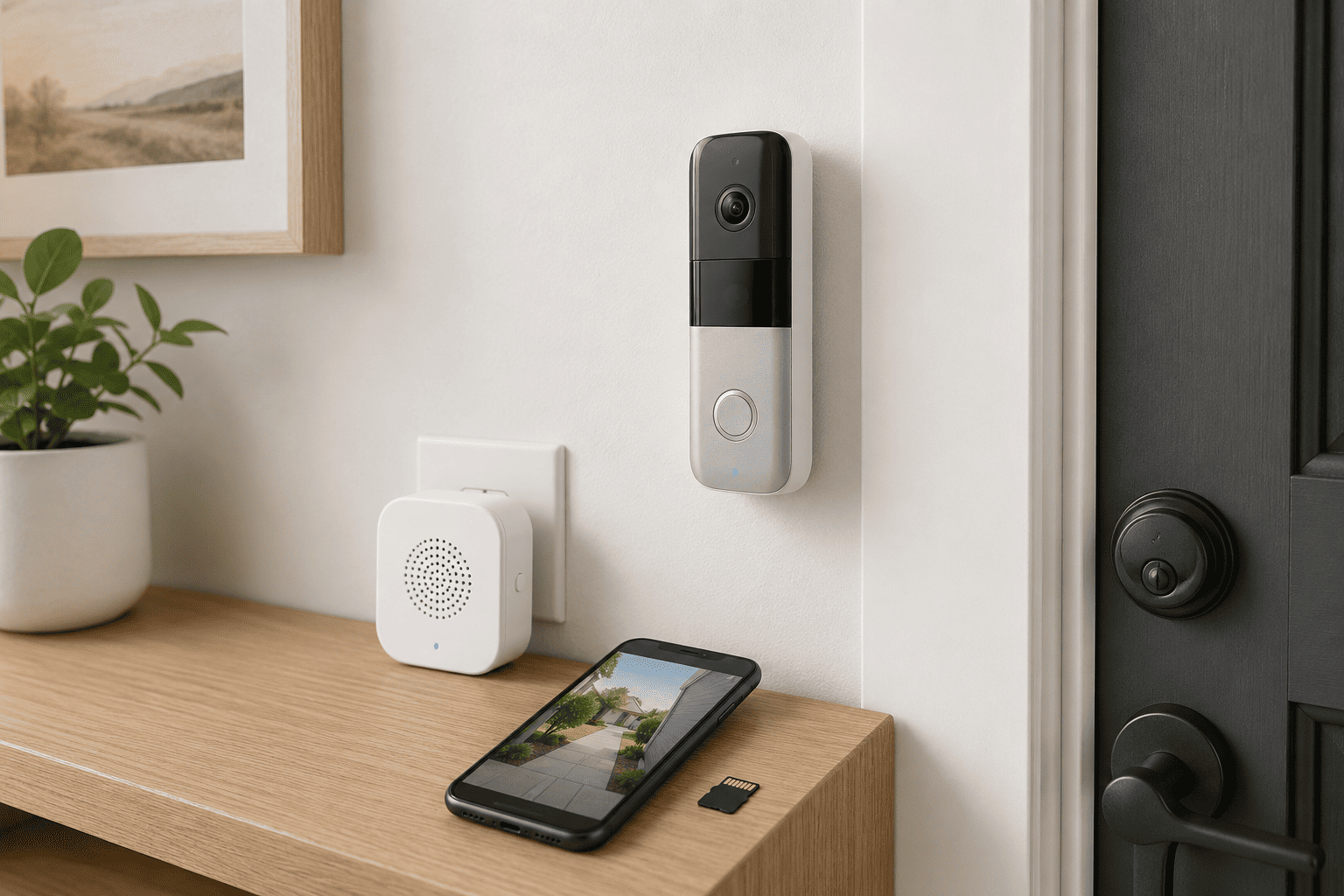
If recurring cloud fees are one reason you are considering replacing your Ring, the BOIFUN Video Doorbell Camera is one of the more interesting lower-cost alternatives.
The biggest attraction is straightforward: you can use local storage instead of depending entirely on a paid subscription. The doorbell supports a microSD card up to 128GB, according to its documentation, although the card is not included. It also records in 2K, has a 166-degree field of view, HDR night vision, two-way audio, motion detection, and an included indoor chime.
There is one important networking limitation to understand before buying it. BOIFUN supports 2.4 GHz Wi-Fi only. That is not automatically a bad thing, since 2.4 GHz often reaches farther through walls than 5 GHz, but you need to make sure your router is configured in a way that allows the doorbell to connect.
The battery-powered installation also makes BOIFUN useful for apartments, rental homes, or entrances where running doorbell wiring is inconvenient.
The Amazon listing you provided was around $40.49, though prices can change. At that level, I would view it as a practical choice for someone who wants the core doorbell-camera functions without building another monthly subscription into the household budget.
It would not be my first choice for someone heavily invested in a larger smart security ecosystem. For a straightforward front-door camera with local storage and a low initial cost, though, the value is easy to understand.
Some people want something closer to a full security platform rather than a simple standalone doorbell. In that case, paying a little more upfront can make sense, especially if you care about installation flexibility, a wider view of visitors and packages, and the option to add other cameras later.
That leads to the other alternative I would consider.
2
Arlo Video Doorbell 2K (2nd Gen): Best for a More Complete Security Setup

The Arlo Video Doorbell 2K (2nd Gen) is the one I would lean toward if you want more flexibility and expect your doorbell to become part of a larger home security setup.
It can be installed wirelessly using its rechargeable battery or connected to compatible existing doorbell wiring. Arlo gives it a 1944 x 1944 video resolution, HDR, night vision, two-way audio, and a wide 180-degree field of view designed to show more of a visitor from head to toe.
That wider framing is particularly useful around packages. A traditional landscape-style camera can give you a great view of someone’s face while cutting off the box sitting directly below the doorbell.
Arlo also supports live streaming and push notifications without requiring a paid plan. The subscription question becomes more important when you want cloud video history and some of Arlo’s more advanced features. Arlo states that 2K cloud recording requires an Arlo Secure plan.
Local recording is possible with compatible Arlo SmartHubs, but that adds hardware and makes the setup less simple than BOIFUN’s microSD approach.
The Amazon listing you shared was around $64.95. For the extra money, I think Arlo makes more sense for someone who values a mature app ecosystem, wired or wireless installation, wider head-to-toe coverage, and room to expand into additional Arlo security cameras later.
What I Would Look for Before Replacing a Ring Doorbell
If your Ring really is ready for retirement, do not choose the replacement based only on resolution. A 2K label looks good on a product page, but everyday convenience matters much more after the first week.
Think about how you want to power it
Battery models are easier to install, but charging becomes another maintenance task. Hardwired support is useful if you already have compatible doorbell wiring and want fewer interruptions.
Check the Wi-Fi requirements
This is easy to overlook. A doorbell mounted outside your home may be much farther from the router than your phone or laptop normally is.
BOIFUN uses 2.4 GHz Wi-Fi only. Arlo gives you a different ecosystem and can connect directly to your Wi-Fi router. Whatever you choose, make sure your front door actually has a dependable wireless signal.
Decide how important subscription-free recording is
There is a difference between being able to watch a live feed without a subscription and being able to save useful recordings without one.
BOIFUN’s local microSD support is appealing if avoiding recurring fees is a priority. Arlo still provides basic functions without a plan, but cloud video history and certain advanced features require a subscription.
Look at the camera’s field of view
For a doorbell, vertical coverage is often just as important as image resolution.
A wider, head-to-toe view can help you see both a visitor and a package sitting near the doorstep. Think about your actual entrance rather than assuming the camera with the biggest resolution number will automatically show more.
Do not ignore the app
You will probably interact with the app far more often than the physical doorbell. Notifications, Live View speed, two-way audio, recording access, and motion controls all affect how useful the doorbell feels day to day.
That is one reason I would spend a little more for Arlo if the doorbell is going to be part of a larger camera setup.
Final Thoughts
If your Ring Doorbell is not working, I would not replace it immediately. Check Device Health, confirm the power source, inspect the Wi-Fi signal, review notification and motion settings, and reboot the doorbell first. Those steps cover a large percentage of the problems that make a perfectly usable Ring Doorbell appear broken.
If troubleshooting does not fix it, your replacement choice comes down to what you want to change about the experience.
Choose BOIFUN if you want an inexpensive battery-powered doorbell with 2K video, local microSD storage, an included chime, and no need to rely on a monthly subscription for basic recording.
Choose the Arlo Video Doorbell 2K (2nd Gen) if you are comfortable spending a little more for wired or wireless installation, wider head-to-toe coverage, and a stronger path toward a larger home security setup.
For most people who simply want to escape recurring fees, I would start with BOIFUN. For a household planning to add more security cameras over time, Arlo is the better long-term fit.