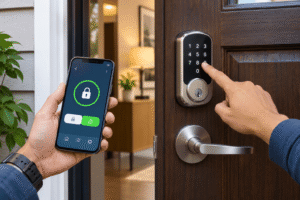
Matter is a smart home standard that lets compatible devices from different brands work with platforms such as Apple Home, Amazon Alexa, Google Home, and Samsung SmartThings. Instead of checking whether every light bulb or switch is made for one specific ecosystem, you can look for Matter support and have more flexibility when building your setup.
Affiliate Disclaimer
This website participates in affiliate programs. We may earn a commission
when you purchase products through links on this page, at no additional
cost to you. Our recommendations are based on independent research and
honest opinions.
That doesn’t mean every Matter device works with every feature in every app. You may still need a compatible controller, the right Wi-Fi network, or a Thread border router. However, Matter makes basic control and setup more consistent, which is a meaningful improvement if you’re tired of juggling separate smart home apps.
I’ll explain what Matter actually does, how it differs from Wi-Fi and Thread, and what you need before buying a Matter-compatible gadget. We’ll also look at a ZINDRA smart switch and Linkind smart bulbs that offer two practical ways to start.
What Matter Actually Means for Your Smart Home Setup
Matter is a shared communication standard maintained by the Connectivity Standards Alliance, an industry organization supported by major smart home companies. It defines how compatible devices identify themselves, communicate securely, and expose common functions to controllers.
Think of it as a common language between a smart light and your preferred home app. A Matter light doesn’t have to be built exclusively for Apple Home or Alexa to offer supported functions in either ecosystem. You still need the appropriate controller or platform setup, but you’re less dependent on one manufacturer’s private integration.
- Common device control: Supported functions such as switching a light on, dimming it, or changing its color can work across compatible platforms.
- Multiple ecosystems: Matter multi-admin lets you share a compatible device with more than one supported smart home platform.
- Local communication: Many core commands travel over your home network rather than requiring a round trip through a vendor cloud.
- Security foundation: Matter uses device authentication and encrypted communication as part of its specification.
That consistency is the main benefit. You gain more choice when buying devices and have a better chance of keeping them useful if you change your preferred smart home platform later.
Matter vs Wi-Fi vs Thread: They Do Different Jobs
Matter isn’t a new wireless frequency that replaces Wi-Fi. It is the communication standard running over supported networks, principally Wi-Fi, Thread, and Ethernet. Bluetooth Low Energy is commonly used during initial setup, rather than as the everyday control connection.
A Wi-Fi Matter bulb connects through your wireless router. A Thread Matter sensor connects to a low-power mesh network and generally needs a compatible Thread border router to communicate with the rest of your home network. Wired devices can use Ethernet where supported.
- Matter: Defines how compatible smart devices communicate and expose their functions.
- Wi-Fi: Carries network traffic for many smart plugs, bulbs, and switches, often over 2.4 GHz.
- Thread: Provides a low-power mesh network that is useful for compatible sensors and smaller smart devices.
- Thread border router: Connects the Thread network with your home IP network. Not every Matter hub includes this function.
The ZINDRA switch and Linkind bulbs in this article use 2.4 GHz Wi-Fi, so they don’t need a Thread border router just to join the network. Their Matter platform integration can still require an appropriate Matter controller or hub.
Why Matter Makes Apple, Alexa, Google, and SmartThings Easier
Previously, a smart gadget might work brilliantly with Alexa but offer limited support for Apple Home. You could end up choosing products according to the voice assistant you owned rather than the features you wanted. Matter aims to reduce that kind of ecosystem lock-in.
For example, you might control a supported Matter bulb from Apple Home while someone else in your household uses Alexa. With the right multi-admin setup, both platforms can access the same device. You don’t have to buy two separate bulbs or replace your lighting because someone prefers a different assistant.
Still, features aren’t guaranteed to match across apps. Basic on/off, dimming, and color commands may be available in multiple ecosystems, while music synchronization, elaborate lighting scenes, or firmware updates may remain inside the manufacturer’s own app.
Do You Need a Matter Hub or Can You Use Your Phone?
This is where smart home shopping can become confusing. A product may advertise Matter support, but that doesn’t mean any smartphone can provide all its features without another device. Platform-specific setup and remote control often depend on a compatible Matter controller.
Some smart speakers, displays, and dedicated hubs act as Matter controllers. The exact eligible models and software requirements vary across Apple, Amazon, Google, and SmartThings. A Thread border router is a separate requirement for Thread-based devices, although some products combine both roles.
- For Wi-Fi Matter devices: Check that your home router supports the required band and that your chosen ecosystem has the controller it needs.
- For Thread Matter devices: Confirm you have access to a compatible Thread border router in addition to any relevant platform controller.
- For remote control: Check what your platform or manufacturer’s app requires when you’re away from home.
- For multiple platforms: Expect to commission the device into one ecosystem and share it with others using Matter multi-admin.
A phone can be part of the setup process, but it isn’t safe to assume it replaces a persistent controller for every Matter ecosystem. Check the support instructions for the platform you actually plan to use.
What Matter Can and Cannot Do Without Internet
Matter’s local communication is an advantage when your internet connection becomes unreliable. Once supported devices and controllers are working on the same local network, certain basic commands can continue without access to the vendor’s cloud.
However, you shouldn’t interpret that as a promise that every automation or remote feature works offline. Voice assistants, access outside the home, firmware updates, and some third-party integrations may still need internet connectivity.
- Often local: Basic supported commands between a Matter controller and device on a functioning home network.
- May need internet: Remote access, cloud voice services, app accounts, and manufacturer-specific features.
- Still needs power and networking: A Matter switch cannot operate normally if its power is off or its essential network connection fails.
Matter can reduce cloud dependence for supported operations, but it doesn’t make your router, controller, and other components irrelevant.
What to Check Before Buying Your First Matter Device
The Matter logo is a useful starting point, not the entire buying checklist. Physical compatibility, electrical specifications, network requirements, and platform support still matter, especially with devices that connect to household wiring.
- Verified compatibility: Look for genuine Matter certification and support for your chosen ecosystem and device type.
- Network requirements: Check whether the product uses 2.4 GHz Wi-Fi, Thread, or another supported connection.
- Controller requirements: Confirm which hub, speaker, or platform controller is needed for the functions you want.
- Device fit: For bulbs, check voltage, socket type, brightness, and fixture clearance. For switches, check wiring and circuit type.
- Advanced features: Find out whether special scenes, music sync, or updates require the manufacturer’s app.
A few minutes with the compatibility details can save you from buying something that pairs successfully but doesn’t work the way you expected.
Two Matter-Compatible Lighting Products Worth Considering
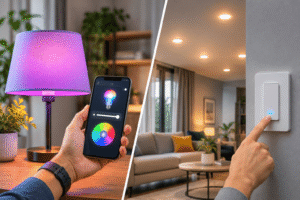
Lighting is a straightforward place to start because you can immediately see whether a device responds across your chosen platforms. A smart wall switch keeps control at the wall, while smart bulbs let you adjust individual lights and colors.
The ZINDRA touch switch and Linkind six-pack serve those different needs. Neither is universally better. The right choice depends on your wiring, fixtures, and the level of lighting control you want.
1
ZINDRA Matter Smart Light Switch Review: Best for Wall Control

The ZINDRA Matter Smart Light Switch is an affordable way to add smart control to a compatible existing lighting circuit. At the supplied price of $ 15.99, it offers a white glass touch surface and Matter integration with supported Apple Home, Alexa, Google Home, and SmartThings setups.
Rather than replacing every bulb, the switch controls the light circuit from the wall. That’s useful when you want familiar physical operation alongside app scheduling or voice control. Its illuminated indicator can also make the switch easier to locate in a dark room.
The most important detail is wiring compatibility. ZINDRA specifies a neutral wire and a single-pole circuit, so this isn’t a drop-in replacement for every switch. It’s not intended for three-way wiring, traditional dimming circuits, or boxes without a neutral conductor.
- Matter platform support: Advertised for compatible Apple Home, Alexa, Google Home, and SmartThings controllers.
- 2.4 GHz Wi-Fi: Connects through a supported home Wi-Fi network rather than Thread.
- Tempered glass touch panel: Provides a clean physical control surface with an indicator light.
- Scheduling options: Advertises timers, countdowns, and automation or away-mode controls through supported software.
- Single-pole installation: Requires the correct electrical wiring, including a neutral wire.
At this price, it could be useful if you want a simple smart switch without replacing the light fixtures themselves. But I wouldn’t attempt installation until you’ve confirmed the wiring, voltage, box depth, load rating, and certification details for your exact unit.
Because this device connects to mains electricity, follow the manufacturer’s instructions and local electrical code. If you’re uncertain about the wiring, use a qualified electrician. I also wouldn’t combine it with smart bulbs unless you’ve planned how those bulbs will remain powered when the wall switch is off.
2
Linkind Matter Smart Bulbs Review: Best for Color Lighting

The Linkind Matter Smart Light Bulbs 6-Pack makes more sense if you want flexible lighting without replacing a wall switch. The supplied $42.99 listing covers six A19 bulbs with E26 bases, adjustable colors, and Matter support for compatible smart home platforms.
Each bulb is advertised at 800 lumens, roughly equivalent to a conventional 60-watt incandescent bulb in brightness, while drawing about 9 watts. That’s enough light for many table lamps and ordinary fixtures, though the actual result depends on shade design and room size.
The fun part is individual control. You can adjust brightness and color for a bedroom, living room, or movie night, and supported scenes allow several lights to change together. Linkind also advertises music synchronization through the AiDot app, which is a vendor-specific feature rather than a universal Matter capability.
- Matter compatibility: Supports basic control through eligible Apple, Google, Alexa, and SmartThings systems.
- 16 million colors: Offers adjustable RGB lighting alongside tunable white settings.
- 800-lumen output: Suitable for general lighting in many household fixtures.
- 2.4 GHz Wi-Fi: Requires a compatible wireless network for connectivity.
- AiDot extras: Manufacturer app offers additional scene and music-sync features.
- Standard E26 base: Designed for compatible 120V fixtures; check local voltage and socket type before buying.
Linkind says the bulbs can be used through its AiDot app without a separate hub, while third-party Matter ecosystems may need their own controller. The company also warns against using these smart bulbs with traditional wall dimmers, which can interfere with their power and operation.
I’d consider this six-pack if you want color changes, dimming, and room-by-room control. It’s especially attractive when you already have compatible light fixtures and don’t want to modify electrical wiring. Just remember that switching off power at the wall also takes the smart bulb offline.
ZINDRA Switch vs Linkind Bulbs: Which One Fits Better?
These products are easiest to compare by the kind of control you want. A smart switch manages the power to its connected lights, while smart bulbs adjust light output individually as long as they receive power.
- For normal bulbs on one circuit: Choose the ZINDRA switch if your wiring and electrical requirements match.
- For adjustable colors and brightness: Choose the Linkind bulbs and keep their power available.
- For avoiding electrical installation: Linkind is typically simpler because it uses standard bulb sockets.
- For keeping physical wall control: ZINDRA is more natural if everyone uses the wall switch.
- For the initial price: ZINDRA is listed at $15.99 for one switch; Linkind costs $42.99 for six bulbs.
For my first Matter lighting purchase, I’d lean toward the Linkind bulbs if the goal is experimenting with smart home features without touching house wiring. I’d consider the ZINDRA switch when controlling existing ordinary lights is the more important task.
How to Set Up a Matter Device Without Getting Stuck
Most Matter devices arrive with a QR code or numeric setup code. The process generally involves powering the gadget, opening a compatible smart home app, and following the prompts to add it to your network.
- Check the basics: Confirm power, supported Wi-Fi or Thread connectivity, controller compatibility, and any electrical requirements.
- Install the device: Fit the bulb into a suitable socket or have the switch installed correctly with power safely isolated.
- Open your chosen platform: Use Apple Home, Alexa, Google Home, SmartThings, or the supported manufacturer app as instructed.
- Scan the Matter code: Follow the pairing instructions and keep the device within the supported network range.
- Name and test it: Use a clear room-based name, then test the intended basic controls.
- Add another ecosystem if needed: Use the existing platform’s Matter sharing or multi-admin option instead of assuming you can rescan the original code.
If pairing fails, check whether your phone and controller are using the right home network, whether the device supports the Wi-Fi band, and whether a previous setup attempt left it paired elsewhere. Resetting according to the manufacturer’s instructions may help, but don’t start by randomly changing router security settings.
Is Matter Really Worth Choosing in 2026?
For most new smart home purchases, Matter support is a worthwhile feature because it reduces the chance of getting locked into one ecosystem. You have a clearer path to use compatible devices with different platforms, and many basic controls can operate locally.
It doesn’t guarantee perfect setup, identical app features, or support for every older gadget. Your network quality, controller software, hardware requirements, and device manufacturer’s support still matter. So I’d treat Matter as a strong compatibility advantage rather than a promise that every product will work anywhere.
If you’re starting with lighting, the Linkind six-pack is a practical option for trying colors and automation in existing suitable lamps. The ZINDRA wall switch is more relevant when you want convenient control of an existing lighting circuit, and your home has the required wiring.
Final Thoughts: Matter Makes Smart Home Choices Less Restrictive
Matter matters because it gives compatible gadgets a common way to communicate across major smart home platforms. It doesn’t replace Wi-Fi, Thread, or good product design, but it can make your smart home easier to expand without starting over every time you change apps or assistants.
I’d choose Matter-compatible devices when the price and features make sense, then check the practical details before ordering. For a simple introduction, Linkind’s color-changing bulbs are the easier option when your fixtures are compatible. If you want smart control at the wall and have suitable electrical wiring, the ZINDRA Matter switch is worth considering.
The best smart home isn’t necessarily the one with the most devices. It’s the one where your lights and controls work reliably, where you expect them to, without forcing you to manage a separate system for every brand.