A good podcast microphone can completely change how your content sounds. Your voice is the main connection between you and your audience, and even great ideas can feel less professional when the audio quality is distracting.
Affiliate Disclaimer
This website participates in affiliate programs. We may earn a commission
when you purchase products through links on this page, at no additional
cost to you. Our recommendations are based on independent research and
honest opinions.
The good news is that you do not need an expensive studio setup to get clear podcast audio in 2026. There are excellent microphones available for beginners working from a bedroom desk, creators recording videos, streamers building a channel, and professionals creating long-form content.
The right microphone depends on your setup, experience level, and how much control you want over your sound. A simple USB microphone can be the easiest way to start, while an XLR studio microphone gives you more flexibility if you are building a dedicated recording space.
In this guide, we’ll look at what actually matters when choosing a podcast microphone, explain the differences between microphone types, and cover two options that fit different recording needs and budgets.
What Makes a Good Podcast Microphone?
A podcast microphone does one important job: it captures your voice clearly while reducing distractions around you.
Many beginners focus only on microphone price, but the microphone is just one part of the recording process. Your room, microphone placement, and recording technique also affect the final result.
A good podcast microphone should provide:
- Clear voice reproduction: Your voice should sound natural without excessive harshness or distortion.
- Background noise control: The microphone should help reduce unwanted sounds from your environment.
- Consistent volume: Your voice should remain balanced without sudden changes.
- Easy setup: You should spend more time creating content and less time troubleshooting equipment.
- Comfortable monitoring: Being able to hear yourself while recording helps you catch problems early.
A $500 microphone in a noisy room may sound worse than a well-positioned $100 microphone in a quiet space.
USB vs XLR Microphones: Which One Should You Choose?
The biggest decision when buying a podcast microphone is whether you want a USB or XLR setup.
Both can produce excellent results, but they are designed for different types of creators.
USB Microphones: Simple Setup for Most Creators
USB microphones connect directly to your computer or mobile device. They do not require additional audio equipment, which makes them popular among beginners and home creators.
They are ideal for:
- Starting your first podcast.
- YouTube videos.
- Streaming.
- Online meetings.
- Voice-over work.
The main advantage is convenience. You can connect the microphone, adjust a few settings, and start recording.
For many people, a good USB microphone is all they need.
XLR Microphones: Better Control for Advanced Setups
XLR microphones are commonly used in professional studios. They connect through an audio interface or mixer, which gives you more control over your recording chain.
They are useful for:
- Professional podcasts.
- Multi-person recording setups.
- Music recording.
- Long-term studio setups.
The downside is that an XLR microphone requires additional equipment. You may need an audio interface, cables, and more technical knowledge.
For creators who want to build a serious recording setup, the extra investment can be worthwhile.
Condenser vs Dynamic Microphones for Podcasting
Another important difference is the microphone type.
Condenser Microphones
Condenser microphones are popular for studio recording because they capture detailed and natural vocal tones.
They are great for:
- Solo podcasts.
- Voice-over work.
- Controlled recording rooms.
- Streaming.
However, they are more sensitive, which means they can pick up more background noise if your room is not quiet.
Dynamic Microphones
Dynamic microphones are often preferred for broadcast-style recording because they focus more directly on the speaker’s voice.
They work well in:
- Less treated rooms.
- Group podcasts.
- Noisy environments.
The trade-off is that they usually capture less fine detail compared with condenser microphones.
Why Microphone Placement Matters
Even the best microphone will not sound great if it is positioned incorrectly.
A few simple habits can improve your recording quality:
- Keep the microphone close to your mouth.
- Speak directly toward the microphone.
- Use a pop filter to reduce harsh “P” and “B” sounds.
- Avoid placing the microphone near noisy electronics.
- Record in a room with fewer hard surfaces.
Many audio problems come from setup mistakes rather than the microphone itself.
Features Worth Paying Attention To
When comparing podcast microphones, focus on features that affect your actual recording experience.
Polar Pattern
The polar pattern determines how a microphone captures sound.
A cardioid pattern is commonly preferred for podcasting because it focuses on sound coming from the front while reducing noise from the sides and back.
Monitoring
A headphone monitoring port lets you hear your voice in real time.
This helps you notice:
- Background noise.
- Distortion.
- Volume problems.
- Placement issues.
Gain Control
Built-in gain controls make it easier to adjust microphone sensitivity without opening software settings.
This is especially useful during live recordings or streaming.
Mute Button
A physical mute button can be useful during:
- Live streams.
- Online meetings.
- Podcast recordings.
- Gaming sessions.
Small features like this can make your workflow smoother.
Choosing a Microphone Based on Your Setup
The best microphone depends on where and how you record.
Bedroom or Home Office Setup
If you record from a normal room without professional acoustic treatment, a USB microphone with noise reduction features can be a practical choice.
You want something that is easy to use and does not require extra equipment.
YouTube and Streaming Setup
Creators who record videos, livestreams, or gaming content often benefit from a microphone with quick controls like mute, volume adjustment, and headphone monitoring.
Professional Podcast Studio
If you are recording regularly and want the highest level of control, an XLR microphone paired with a good audio interface gives you more flexibility.
This setup takes more effort but gives you room to grow.
Finding the Right Podcast Microphone for Your Needs
Once you understand the basics, choosing a microphone becomes much easier.
A beginner does not need the same equipment as a professional studio. Spending more does not automatically mean better results if the microphone does not match your environment.
For most creators, the choice comes down to two priorities:
- Convenience and simplicity
- Maximum recording control
The following two microphones represent those two approaches. One is designed for easy USB recording with useful built-in controls, while the other is a studio-style XLR microphone for creators who want professional vocal quality.
1
ZealSound Podcast Microphone for PC: A Complete USB Setup for Beginners and Creators
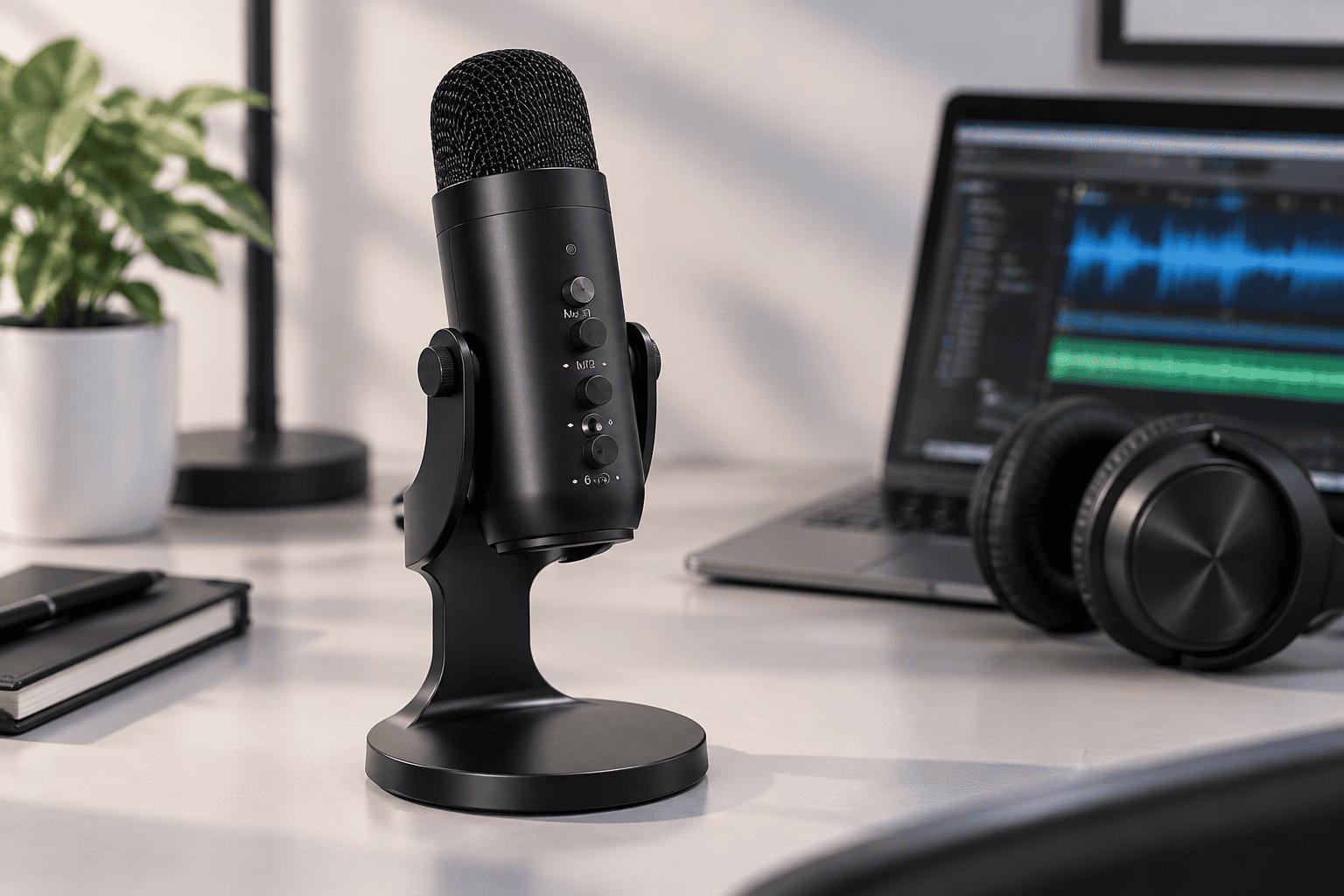
The ZealSound Podcast Microphone for PC is designed for creators who want a simple recording setup without buying additional audio equipment.
It uses a USB connection, which makes it easy to connect to computers, tablets, and compatible mobile devices. For podcasting, streaming, YouTube videos, online classes, and voice recording, it provides many of the controls beginners usually need.
The biggest advantage is convenience. You get microphone controls, headphone monitoring, and noise reduction features in one compact setup.
Key features and everyday benefits:
- USB plug-and-play setup:
The microphone does not require complicated installation. You can connect it and start recording on compatible devices. - Cardioid pickup pattern:
The microphone focuses on your voice from the front while helping reduce unwanted sounds from other directions. - Noise reduction mode:
The built-in noise reduction feature is designed to reduce common background sounds like keyboard clicks, computer fans, and room noise. - Real-time headphone monitoring:
The built-in 3.5mm headphone jack allows you to hear your voice without noticeable delay while recording. - Physical control knobs:
Dedicated controls allow you to adjust microphone volume, monitoring volume, and echo levels directly on the microphone. - Instant mute button:
The mute button makes it easy to quickly turn off audio during live streams, meetings, or recordings. - Wide device compatibility:
It works with platforms including Windows PCs, Macs, tablets, and compatible mobile devices.
Price and who it’s for
At the supplied price of $34.99, the ZealSound microphone offers a lot of useful features for beginners and everyday creators.
I would recommend it if you are starting a podcast, creating YouTube content, streaming, or recording voice-overs and want a microphone that works without a complicated setup.
It is especially suitable for people who want physical controls and monitoring features without investing in an audio interface.
If you are building a professional studio and need maximum audio customization, an XLR microphone may be a better long-term choice.
2
RØDE NT1 Signature Series Studio Condenser Microphone: For Professional Vocal Recording

The RØDE NT1 Signature Series Studio Condenser Microphone is built for creators who want studio-quality vocal recording and more control over their sound.
RØDE’s NT1 line has been widely recognized among musicians, voice-over artists, and content creators because of its natural vocal reproduction and low self-noise.
Unlike USB microphones, this is an XLR microphone. That means you will need an audio interface to connect it to your computer, but the setup gives you more flexibility as your recording needs grow.
Key features and everyday benefits:
- Studio-quality condenser sound:
The large-diaphragm condenser design captures detailed vocal recordings with a natural tone. - Very low self-noise:
The microphone is designed to keep internal noise extremely low, helping your recordings sound cleaner. - Cardioid pickup pattern:
It focuses on the speaker’s voice while reducing unwanted room sound from behind the microphone. - Complete recording package:
The box includes an SM6 shock mount, pop filter, XLR cable, and dust cover. - Professional vocal performance:
It works well for podcasts, voice-over projects, streaming, and vocal recording. - Room to grow:
Because it uses an XLR connection, you can upgrade your audio interface and recording setup over time.
Price and who it’s for
At the supplied price of $135.00, the RØDE NT1 Signature Series is a stronger investment compared with beginner USB microphones.
I would choose this microphone if you are serious about podcasting, creating professional voice content, or building a long-term recording setup.
It is a better fit for creators who are comfortable investing in an audio interface and want more control over their final sound.
For someone recording casually or just starting out, a USB microphone may be more practical.
What to Consider Before Buying a Podcast Microphone
Choosing a microphone is not just about sound quality. Think about how you will actually use it.
Your Recording Environment
Your room affects your audio more than many people expect.
If you record in a normal bedroom or office, a microphone with noise reduction features may be more useful than an extremely sensitive studio microphone.
A treated recording space gives you more freedom to use detailed condenser microphones.
Your Experience Level
Beginners usually benefit from simplicity.
A USB microphone lets you start recording quickly without learning extra equipment.
More experienced creators may appreciate the control that comes with an XLR setup.
Future Plans
Think about where you want your content to go.
If you are experimenting with podcasting, a simple microphone is enough.
If you plan to create content professionally for years, investing in a better recording system may save you from upgrading later.
Accessories Matter Too
A microphone is only one part of your setup.
Useful additions include:
- Pop filters.
- Boom arms.
- Shock mounts.
- Headphones.
- Acoustic treatment.
These accessories can improve your recordings and make your workflow more comfortable.
Final Thoughts: Which Podcast Microphone Should You Buy?
The best podcast microphone depends on your goals, budget, and recording setup.
The ZealSound Podcast Microphone is a practical choice for beginners and creators who want a simple USB solution. It provides useful controls, monitoring, and noise reduction features without requiring additional equipment.
The RØDE NT1 Signature Series is better for creators who want a professional recording setup and are willing to invest in an XLR system. Its low noise and studio-focused design make it a strong option for serious podcasting and voice work.
If you are recording your first episodes, creating YouTube videos, or streaming casually, start with a microphone that makes the process easy. If audio quality is a major part of your work and you plan to grow your setup, investing in a studio microphone can make more sense.
The best microphone is not always the most expensive one. It is the one that fits your room, your workflow, and the type of content you want to create.