Most people use headphones in basically the same way every day: connect them, press play, adjust the volume, and move on. But a few small changes can make headphones sound better, feel more comfortable, and even last longer.
Affiliate Disclaimer
This website participates in affiliate programs. We may earn a commission
when you purchase products through links on this page, at no additional
cost to you. Our recommendations are based on independent research and
honest opinions.
You don’t need expensive audio equipment or technical knowledge either. Some of the most useful headphone habits involve fit, volume, EQ, cleaning, and how you connect your headphones to different devices.
Here are five headphone tips that are actually worth knowing. We’ll start with the three that can improve your listening experience immediately.
1. Louder Does Not Always Mean Better Sound
When music sounds weak or unclear, the first instinct is usually to turn up the volume.
That can make the music feel more exciting at first, but it doesn’t necessarily improve sound quality. In fact, listening too loudly can make certain frequencies feel harsh and can hide some of the smaller details in a recording.
There is also the obvious hearing issue. The louder your headphones are, the less time you should spend listening at that level.
Try lowering the volume slightly
If you normally listen near the upper end of your phone’s volume range, lower it by a few steps and give your ears a minute to adjust.
You may start noticing:
- Vocals sounding clearer
- Less harshness in cymbals and high frequencies
- Better separation between instruments
- Less listening fatigue after an hour or two
- Fewer moments when you feel like you need another volume increase
Your ears adapt surprisingly quickly. After listening loudly for a while, normal volume can temporarily feel too quiet.
That’s one reason I don’t keep increasing the volume every time a song sounds a little flat.
Background noise changes how loud you listen
The environment matters too.
On a quiet couch at home, you may be perfectly comfortable at moderate volume. On a bus, airplane, or crowded street, outside noise can make you increase the volume without realizing how loud your headphones have become.
If you regularly listen in noisy places, good passive isolation or active noise cancellation can sometimes be more useful than simply turning the music up.
The goal isn’t to make everything louder. It’s to hear what you’re listening to without fighting the environment around you.
2. Headphone Position Can Change the Sound More Than You Think
This is one of the easiest things to overlook.
Two people can use the exact same headphones and hear noticeably different bass, vocals, and overall balance simply because the headphones sit differently on their heads or ears.
This matters with both over-ear headphones and earbuds.
With over-ear headphones, check the ear cup position
The drivers inside your headphones are designed to sit in a particular position relative to your ears. If the ear cups sit too high, too low, or too far forward, the sound can change.
Before blaming your headphones for weak bass or thin sound, try adjusting the headband.
Move each ear cup slightly until:
- Your ears sit comfortably inside the pads.
- The pads create an even seal around your ears.
- The headband does not pull the cups upward.
- Your glasses are not creating a large gap in the seal.
Even a small opening between the ear pad and your head can reduce bass response.
Glasses can affect the seal
If you wear glasses, this is especially noticeable.
Thicker frames can create a small gap between your head and the ear cushion. That doesn’t make the headphones unusable, but it can slightly change bass response and noise isolation.
You don’t need to stop wearing your glasses. Just be aware that fit matters.
Sometimes repositioning the ear cups by half an inch improves the sound more than changing five EQ settings.
Earbud tips matter even more
With in-ear headphones, the ear tip creates the seal.
If the tip is too small, outside noise gets in and bass tends to sound weak. If it’s too large, the earbuds may feel uncomfortable or slowly push themselves out of your ears.
A good fit should feel secure without creating uncomfortable pressure.
Try the different tip sizes included with your earbuds instead of automatically using the medium pair that comes installed.
You may even find that your ears need different sizes on the left and right side. That’s completely normal.
A better seal can reduce how much volume you need
This connects directly to the first tip.
When earbuds seal properly, you hear more bass and less outside noise. Because of that, you often don’t need to raise the volume as much.
So before replacing earbuds because they sound thin, check the fit first.
It costs nothing and can make a surprisingly large difference.
3. Don’t Ignore Your Phone’s EQ Settings
Equalizer settings have a strange reputation.
Some people change every slider immediately. Others never touch EQ because they assume the headphone manufacturer already tuned everything perfectly.
I prefer something in between.
If you already like how your headphones sound, leave them alone. But if there’s one specific thing bothering you, EQ can sometimes fix it without requiring new headphones.
Start with the problem, not the sliders
Don’t open an equalizer and randomly move frequencies around.
Instead, ask what you’re actually trying to change.
For example:
- If bass feels too strong, reduce the lower frequencies slightly.
- If voices sound muddy, reducing some bass or lower mids may help.
- If music sounds too sharp, reduce the higher frequencies a little.
- If vocals feel buried, a small midrange adjustment may make them easier to hear.
The important word here is small.
Huge EQ changes often make music sound unnatural.
Presets are a good place to start
Many phones, music apps, and headphone apps already include presets such as:
- Bass Boost
- Vocal
- Rock
- Pop
- Classical
- Treble Boost
You don’t have to keep any of them permanently.
Use them as quick experiments. Listen to a song you know well, switch between a few presets, and notice what changes.
If one sounds better to you, that’s enough.
You don’t need to prove that your EQ curve is technically correct.
Don’t judge EQ with one song
A bass-heavy track might sound great with Bass Boost while a podcast becomes muddy. A bright EQ setting may add detail to one recording and make another exhausting to listen to.
Whenever I change EQ, I test it with a few different things:
- A familiar song
- A vocal-heavy track
- A podcast or spoken voice
- Something with strong bass
- Something with quieter instruments
If the setting works across several types of audio, it’s probably a useful adjustment rather than something that only made one song sound impressive.
One More Thing Before We Get Into Tips 4 and 5
The first three tips are mostly about getting more from headphones you already own.
Lowering unnecessary volume, improving the physical fit, and making small EQ adjustments can change the listening experience without spending a dollar.
But headphones aren’t used in isolation anymore.
Phones are dropping traditional headphone ports, laptops have different connections, Bluetooth headphones still run out of battery, and many of us move between several devices during the same day. That creates a different set of problems that sound quality settings can’t fix.
That’s where the last two tips become especially practical.
4. Keep a Wired Backup Even If You Mostly Use Bluetooth
Bluetooth headphones are convenient, but they have one weakness that never completely goes away: they depend on battery power.
If your headphones die during a flight, commute, work session, or long video call, there is not much you can do unless you can charge them. That is why keeping a wired option around can still be surprisingly useful, even if you rarely use it.
Wired audio is still useful in more places than you think
A simple wired connection can come in handy when:
- Your Bluetooth headphones run out of battery
- You want lower latency for videos or games
- You are connecting to older audio equipment
- Bluetooth is unreliable on a particular device
- You want to save battery on your phone or headphones
- You are traveling and want a simple backup
The problem, of course, is that many newer phones no longer include a 3.5mm headphone jack.
That does not mean wired headphones are useless. You just need the right adapter.
1
USB-C to 3.5mm Headphone Jack Adapter

The USB-C to 3.5mm Headphone Jack Adapter is the kind of accessory that seems unnecessary until the exact moment you need one.
It converts a USB-C port into a standard 3.5mm audio connection, which means you can keep using wired headphones with newer phones, tablets, and laptops that no longer include a dedicated headphone jack.
The listing mentions compatibility with devices such as newer iPhones with USB-C, iPads, Samsung Galaxy phones, and MacBooks. At around $8.99 for a two-pack, it is inexpensive enough to keep one at home and another in a travel bag or backpack.
Best for keeping older headphones useful
I would mainly consider this adapter if you already own wired headphones you like.
There is no reason to replace a good pair just because your new phone removed the headphone jack. A small adapter can keep those headphones useful for years.
It also makes sense if you regularly switch between Bluetooth and wired audio. You might use wireless earbuds most of the day but still prefer wired headphones at a desk, during gaming, or when you do not want to think about battery life.
The two-pack is also practical. Tiny adapters are very easy to lose, so having a spare is more useful than it sounds.
I would keep one if you:
- Still own good 3.5mm headphones
- Use a USB-C iPhone, Android phone, iPad, or laptop
- Want a backup when Bluetooth batteries die
- Travel frequently
- Prefer simple wired audio for some situations
Just make sure your specific phone, headphones, and microphone controls are supported before relying on any adapter for calls or specialized headset functions.
5. Make Your Headphones Easier to Identify and More Personal
This last tip has nothing to do with sound quality.
A lot of people own headphones that look exactly like everyone else’s. Black Sony headphones, white earbuds, silver over-ear models, and similar designs can be easy to mix up at work, school, the gym, or even at home.
Adding a small visual detail can make your pair easier to recognize without covering the whole headphone in stickers or bulky accessories.
Personalization can be practical too
There are a few simple ways to personalize headphones:
- Add a small removable accessory
- Use a subtle decal
- Add a case in a distinct color
- Use replacement ear pads with a different look
- Add a small identifying tag to the carrying case
The key is not to interfere with microphones, buttons, hinges, sensors, or ventilation.
Anything you attach should remain lightweight and should not affect how the headphones fold or sit on your head.
That is where decorative headphone attachments can make sense for the right person.
2
MORWLAT Spider Metal Attachments for Sony Headphones
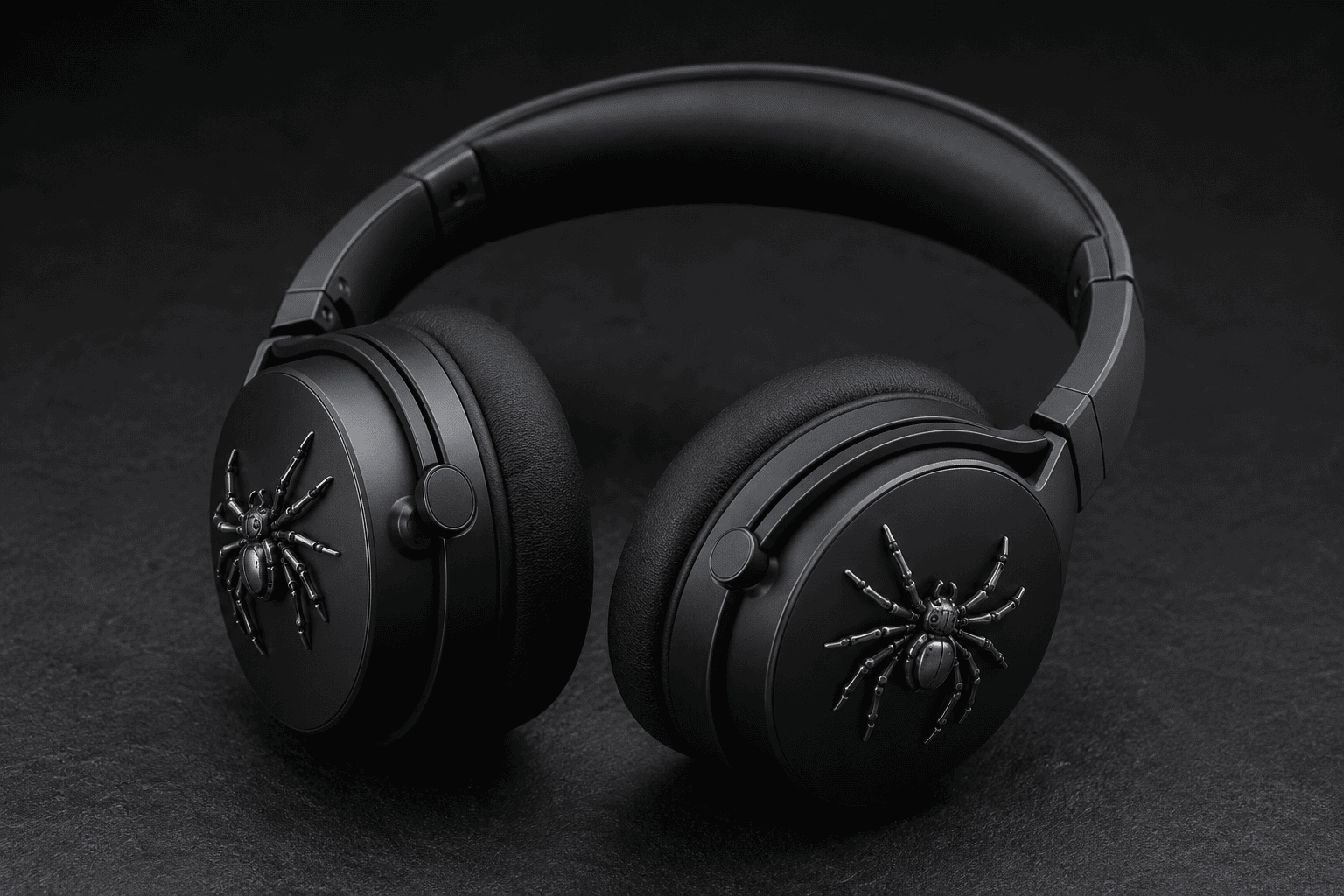
The MORWLAT Spider Metal Attachments are very different from the adapter above.
They are decorative metal accessories designed for certain Sony over-ear headphones, including models listed for the WH-1000XM5, WH-1000XM4, and WH-CH720N families.
At around $11.99, they are not something you buy to improve sound. Their purpose is purely visual.
Best for Sony owners who want a different look
If you own a popular pair of Sony headphones, there is a good chance someone else around you owns the same model in the same color.
That is where an accessory like this becomes useful. The spider-style pieces give the headphones a more distinctive appearance and can make your pair easier to spot.
I would only consider them if you genuinely like the design.
This is not one of those accessories I would recommend to everyone. In fact, that is exactly why it fits this article. Headphone accessories should solve a specific problem or add something you personally value.
For some people, that means better connectivity. For others, it is simply making an expensive pair of headphones feel less generic.
These make the most sense if you:
- Own one of the compatible Sony headphone models
- Want a more noticeable look
- Like decorative headphone accessories
- Want to identify your headphones more easily
- Prefer removable personalization over permanent modifications
Before ordering, double-check the exact Sony model you own. Headphone shells and dimensions vary, and an accessory designed around one model may not fit another correctly.
Small Headphone Habits Matter More Than Expensive Upgrades
The interesting thing about headphones is that better listening does not always require buying better headphones.
Fit, volume, EQ, connection type, and even how you care for the headphones can affect your experience every day.
If I wanted to improve my current setup without replacing anything, I would start with these basics:
- Get the fit and seal right
- Stop using more volume than necessary
- Make small EQ changes instead of extreme ones
- Keep a wired backup available
- Protect and personalize headphones in ways that do not interfere with their function
Those changes cost little or nothing.
What Headphone Accessories Are Actually Worth Buying?
I would not buy accessories just because they appear under “frequently bought together.”
Start with a problem.
Buy for compatibility first
If your phone no longer has a headphone jack but you still own wired headphones you like, a USB-C adapter solves a real problem immediately.
That is a useful purchase.
Buying an adapter when you only use Bluetooth headphones, on the other hand, does not make much sense.
Check your exact headphone model
Fit matters with accessories just as much as it does with replacement ear pads.
A decorative attachment, case, cover, or cushion may be designed around a particular headphone shell. Always check the complete model number instead of assuming every Sony, Bose, Beats, or Apple headphone has the same dimensions.
Avoid accessories that block important parts
Be careful with anything that covers:
- Microphones
- Sensors
- Charging ports
- Buttons
- Hinges
- Air vents
A decorative accessory is not worth interfering with noise cancellation, call quality, or comfort.
Spend according to the problem
A $9 adapter can be much more useful than a $100 accessory if it lets you keep using headphones you already love.
That is a good rule for headphone gear in general.
Do not ask, “What accessory should I buy?”
Ask, “What problem am I trying to fix?”
Final Thoughts
The best headphone tips are usually the small ones people overlook.
First, do not assume louder automatically means better. Second, spend a little time getting the fit right because a poor seal can change both bass and noise isolation. Third, use EQ carefully instead of changing every frequency just because the option exists.
Then think beyond sound.
Keeping a wired backup can save you when Bluetooth or battery life lets you down. If your modern phone only has USB-C, the USB-C to 3.5mm Headphone Jack Adapter is the more practical accessory here because it lets you keep using traditional wired headphones without spending much.
The MORWLAT Spider Metal Attachments, on the other hand, are for a completely different person. If you own compatible Sony headphones and want them to look more distinctive, they offer a simple way to personalize them.
Neither accessory will magically make bad headphones sound great. But combined with better listening habits, the right small accessory can make the headphones you already own much easier and more enjoyable to use.