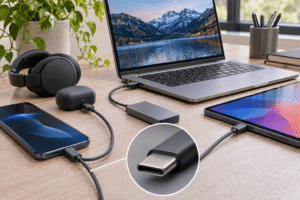
A DAC, or digital-to-analog converter, is the component that turns digital audio from your phone, computer, or music player into an electrical signal your headphones or speakers can reproduce. Every device with an analog headphone output already uses one, but an external DAC can sometimes improve sound quality, reduce unwanted noise, or provide a better connection for your audio equipment.
Affiliate Disclaimer
This website participates in affiliate programs. We may earn a commission
when you purchase products through links on this page, at no additional
cost to you. Our recommendations are based on independent research and
honest opinions.
The important part is that buying a DAC doesn’t automatically make your music sound better. If your current device already produces clean audio at a suitable volume, replacing its DAC might make little or no audible difference.
So, before spending money on another piece of audio equipment, it helps to understand what a DAC actually does, how it differs from a headphone amplifier, and when an external unit makes sense.
What a DAC Actually Does Inside Your Audio System
Most music you listen to today is stored or transmitted as digital information. Whether you’re streaming Spotify, watching YouTube, or playing a lossless audio file, your device processes audio as numbers before you hear it.
Your headphones, however, need a continuously changing electrical signal to move their speaker drivers and produce sound.
That’s where a DAC comes in.
The digital-to-analog conversion process works in a few basic steps:
- Your device reads digital audio: A computer, phone, or music player processes the audio data.
- The DAC converts the signal: It reconstructs an analog electrical waveform from the digital information.
- An amplifier drives the output: The signal passes through an amplification stage that provides the voltage and current required by your headphones or speakers.
- Your headphones produce sound: Their drivers move in response to the electrical signal, creating the sound waves you hear.
That process happens continuously while you’re listening to music.
A good DAC aims to reproduce the original digital signal accurately without introducing audible distortion, background noise, or other unwanted changes.
You don’t need an expensive converter to achieve that. Even affordable DAC circuits can deliver highly accurate performance when implemented properly.
Your Phone and Computer Already Have a DAC
One common misunderstanding is that external DACs provide a technology missing from ordinary phones and computers.
In reality, if your laptop has a functioning 3.5 mm headphone jack, it already contains digital-to-analog conversion hardware somewhere in its audio system.
Smartphones with analog headphone jacks work similarly. Some USB-C and Lightning headphone adapters also contain their own DAC circuitry, allowing digital audio from your device to reach traditional wired headphones.
Bluetooth headphones are a little different because they typically receive digital audio wirelessly and perform conversion inside the headphones themselves.
That means adding an external DAC to your computer isn’t automatically an upgrade. You’re replacing or bypassing one audio conversion path with another.
The difference becomes worthwhile when your current audio output has an actual limitation.
For example:
- Audible background hiss: An external DAC may provide a cleaner signal than a noisy built-in audio output.
- Electrical interference: A separate device can sometimes reduce buzzing or unwanted computer-related noise.
- Limited headphone output: A DAC with a stronger headphone amplifier can provide more usable volume and headroom.
- Missing audio connections: External DACs can add optical, coaxial, USB, or RCA connectivity.
- Convenient desktop controls: Physical volume, bass, and treble adjustments may improve everyday usability.
If none of these problems apply to your setup, you might already have everything you need.
DAC vs Headphone Amplifier: Here’s the Difference That Matters
DACs and headphone amplifiers are closely connected, but they perform different jobs.
A DAC converts digital audio into an analog signal. A headphone amplifier takes that analog signal and provides enough electrical power to drive your headphones properly.
Think of the DAC as the part responsible for reconstructing the signal, while the amplifier makes that signal usable for the connected headphones.
Many external audio devices combine both functions inside one enclosure. That’s why you’ll often see products described as DAC/headphone amplifier combos.
The distinction becomes important when your headphones need more power.
A DAC can help with:
- Converting USB, optical, or coaxial digital audio into analog sound.
- Replacing an audio output that introduces noticeable noise or distortion.
- Providing analog outputs for powered speakers or another amplifier.
- Supporting particular digital audio connections and formats.
A headphone amplifier can help with:
- Providing enough volume for headphones that are difficult to drive.
- Maintaining clean output during demanding musical peaks.
- Supplying appropriate voltage or current for compatible headphones.
- Offering more convenient volume control.
A dedicated DAC without suitable amplification won’t necessarily solve a headphone volume problem. Similarly, adding a powerful amplifier won’t automatically improve a signal that’s already distorted.
Can an External DAC Actually Improve Sound Quality?
Yes, an external DAC can improve sound quality, but the improvement depends on what you’re replacing.
If your computer’s headphone output has audible hiss, electrical interference, or distortion, switching to a properly designed USB DAC may produce a cleaner listening experience.
You could hear less background noise, clearer quiet passages, or reduced distortion at higher volumes.
However, if your current DAC is already transparent, meaning its noise and distortion are below audible levels under your listening conditions, another accurate DAC should produce essentially the same sound.
That’s why expensive audio equipment doesn’t always deliver the dramatic improvements suggested by marketing.
A few factors determine whether you’ll hear a difference.
The Quality of Your Existing Audio Output
A laptop with a poorly implemented headphone output might benefit from an external DAC. A modern device with a clean, capable audio circuit may not.
The best starting point is identifying a problem rather than assuming your built-in audio hardware needs replacing.
The Headphones You’re Using
Different headphones require different amounts of power.
Low-impedance headphones are often easy to drive, but impedance alone doesn’t determine power requirements. Sensitivity also matters because it tells you how efficiently headphones turn electrical power into sound.
Some high-impedance headphones need more voltage, while certain low-impedance models require considerable current.
If your headphones already reach comfortable listening levels without distortion, an amplifier upgrade may offer limited benefits.
The Quality of the Audio Recording
A DAC cannot restore musical information that was lost in a poor recording or heavily compressed source.
Likewise, it cannot transform low-quality headphones into detailed reference headphones.
If your music sounds muddy because of the headphones’ frequency response, replacing the DAC probably won’t fix that problem.
Do High-Resolution DAC Specifications Really Matter?
DAC manufacturers often advertise specifications such as 24-bit/192 kHz audio support. Those numbers describe the digital audio formats the converter can accept or process.
Bit depth relates to the available dynamic range of digital audio, while sample rate describes how frequently the signal is sampled.
For context, standard CD-quality audio uses 16-bit/44.1 kHz, which is already capable of excellent sound reproduction.
Higher specifications can be useful for compatibility with certain audio files and production workflows, but they don’t guarantee better audible sound.
The important things to understand are:
- 16-bit audio: Provides enough theoretical dynamic range for most normal music-listening situations.
- 24-bit audio: Offers greater recording and processing headroom, especially useful during production.
- 44.1 kHz and 48 kHz: Common sample rates that can reproduce the audible frequency range.
- 96 kHz and 192 kHz: Higher sample rates that may benefit specialized workflows but don’t automatically improve listening quality.
- Noise and distortion performance: Often more meaningful than the highest supported sample-rate number.
I wouldn’t choose a DAC simply because its specifications include the largest numbers. Connection options, amplifier performance, noise levels, and everyday usability deserve more attention.
Two Fosi Audio DACs That Make Sense for Different Setups
Once you understand what a DAC can realistically improve, choosing one becomes much easier.
You don’t necessarily need a complicated audio system to benefit from an external DAC. A compact desktop unit can provide convenient connections, physical controls, and a dedicated headphone output.
Fosi Audio offers two models worth considering, although they serve slightly different needs.
The Q4 focuses on straightforward desktop audio and home stereo connectivity. The K5 Pro adds gaming-oriented features, microphone support, and a more powerful headphone amplification stage.
1
Fosi Audio Q4 Review: Best for Simple Desktop Audio Upgrades

The Fosi Audio Q4 DAC Headphone Amplifier makes sense if you want to replace your computer’s built-in audio output with a dedicated desktop device. It combines digital-to-analog conversion, headphone amplification, and basic sound controls in a compact enclosure.
At the listed price of $69.99, it’s aimed at relatively simple home audio systems rather than complicated professional recording setups.
One of its most useful features is the combination of USB, optical, and coaxial digital inputs. You can connect compatible audio sources and send the converted signal to wired headphones through the 3.5 mm output or to powered speakers through RCA connections.
That flexibility is particularly convenient if you use both headphones and desktop speakers.
The Q4 also includes physical bass, treble, and volume controls. Instead of opening software settings whenever you want to adjust the sound, you can make quick changes directly on the unit.
According to Fosi Audio, it supports 24-bit/96 kHz audio through USB and up to 24-bit/192 kHz through its optical and coaxial inputs. The company recommends headphones within a 16–200 ohm impedance range.
Some practical features include:
- USB audio input: Connects to a compatible computer for digital audio playback.
- Optical and coaxial inputs: Support additional digital audio sources.
- 3.5 mm headphone output: Provides a dedicated connection for wired headphones.
- RCA outputs: Connect to powered speakers or an external amplifier.
- Bass and treble controls: Let you adjust the sound without software.
- Compact desktop design: Fits into relatively small workspaces.
The Q4’s main limitation is its relatively modest headphone amplification capability compared with more powerful desktop amplifiers. It may not be the best option for unusually demanding headphones.
It also lacks a microphone input, so it’s less convenient if your main setup involves a wired gaming headset.
For ordinary wired headphones, powered speakers, and home-office audio, though, the Q4 provides a practical collection of features. I’d consider it when better connectivity and convenient desktop control are the primary reasons for buying an external DAC.
2
Fosi Audio K5 Pro Review: Best for Gaming and Headphone Power
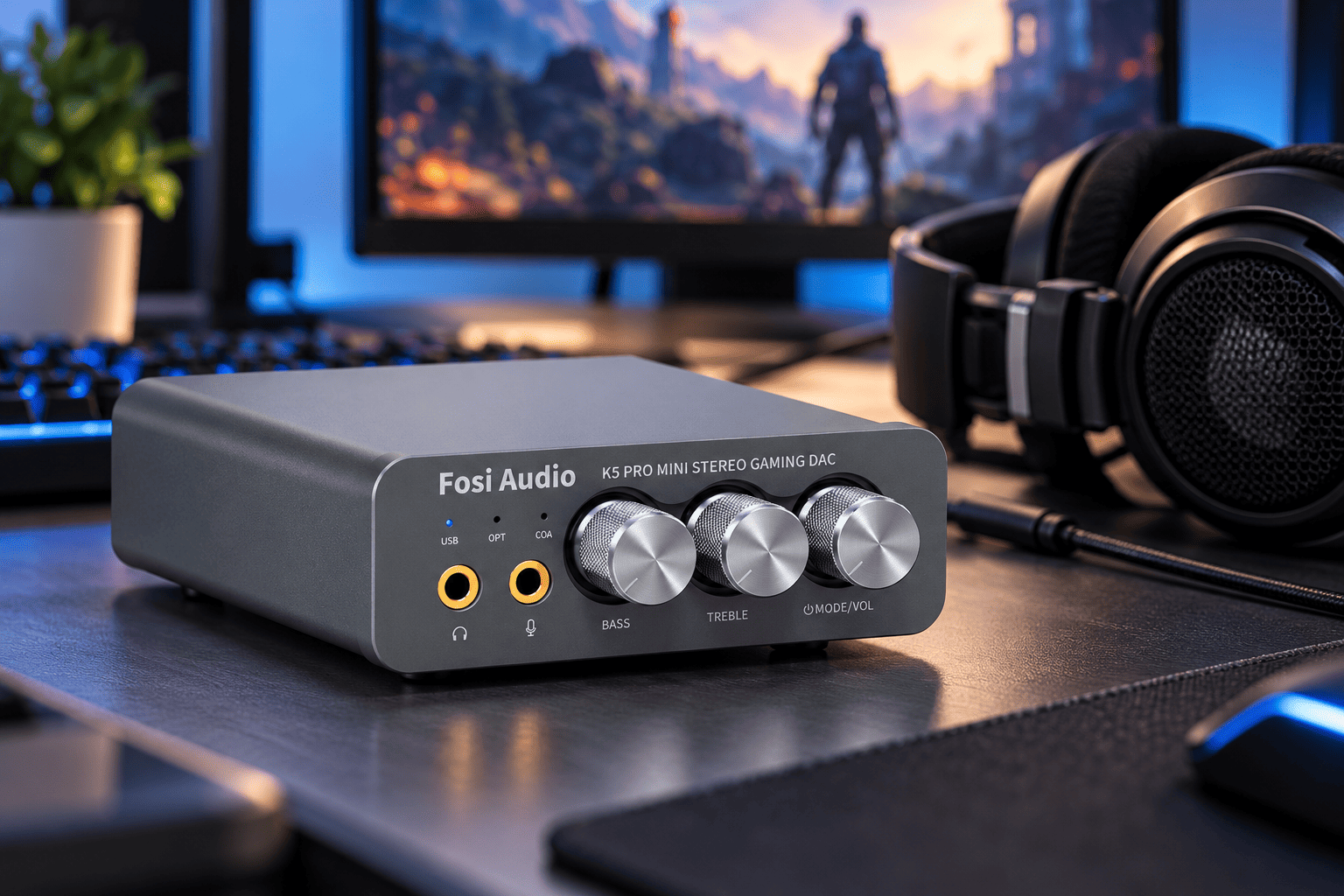
The Fosi Audio K5 Pro Gaming DAC Headphone Amplifier is a more suitable option if your desktop setup includes gaming, voice chat, and demanding wired headphones.
At the listed price of $79.99, it costs about $10 more than the Q4, but that small difference brings several additional capabilities.
The K5 Pro supports USB-C, optical, and coaxial digital inputs, along with a 3.5 mm microphone input. You also get a 3.5 mm headphone output and RCA connections for compatible external audio equipment.
That combination is useful when you want a single desktop device for music playback, gaming audio, and headset communication.
Its headphone amplifier is another important distinction. Fosi Audio specifies up to 1,000 mW into a 16-ohm load and 500 mW into 32 ohms, with lower power ratings at higher impedances. Actual suitability still depends on your headphones’ sensitivity and power requirements.
The K5 Pro includes bass, treble, and volume controls, allowing you to make adjustments without relying entirely on software settings.
Here’s what stands out:
- USB-C connectivity: Provides a digital audio connection for compatible computers and consoles.
- Microphone input: Supports headset communication when used through the appropriate USB connection.
- Stronger headphone amplification: Offers more output power than the Q4 for suitable headphones.
- Optical and coaxial inputs: Adds flexibility for compatible audio sources.
- RCA and headphone outputs: Supports headphones and powered speaker systems.
- Physical audio controls: Makes volume and tone adjustments convenient.
There are a few compatibility details worth understanding before buying.
Fosi specifies USB support up to 24-bit/96 kHz and optical/coaxial support up to 24-bit/192 kHz. Microphone functionality is available through the USB input, not through optical or coaxial connections.
You should also check console compatibility rather than assuming every gaming system supports the same USB audio functions.
The K5 Pro isn’t necessary simply because you play games. But if your setup requires a microphone input, accessible sound controls, or more headphone output power, it offers meaningful advantages over the Q4.
For approximately $80, I’d lean toward the K5 Pro when those additional features are relevant to how you use your computer.
Fosi Audio Q4 vs K5 Pro: Which One Should You Choose?
Both devices perform digital-to-analog conversion and provide dedicated headphone outputs. The more important differences concern connectivity, amplification, and how you intend to use them.
The Q4 is the simpler option, while the K5 Pro is better equipped for gaming and headsets.
Here’s how I’d separate them:
- For everyday desktop music: The Q4 is a reasonable choice if you primarily use headphones or powered speakers.
- For gaming and voice chat: The K5 Pro makes more sense because it includes a microphone input.
- For headphones needing more output power: The K5 Pro offers stronger specified amplification.
- For basic tone adjustments: Both include physical bass and treble controls.
- For USB, optical, and coaxial connections: Both support these input types.
- For the lower upfront price: The Q4 costs $69.99 compared with $79.99 for the K5 Pro.
Neither model automatically guarantees an audible sound-quality improvement over a well-designed built-in DAC.
If your current device already sounds clean and drives your headphones comfortably, the main benefits may come from better connections, easier controls, or additional power rather than a dramatic change in musical detail.
What Actually Matters Before Buying an External DAC?
There are plenty of DAC specifications to compare, but only a few details are likely to affect your everyday listening experience.
Before ordering one, I’d pay attention to the following factors.
1. Your current audio quality
Listen for obvious problems such as background hiss, electrical buzzing, distortion, or insufficient volume. These are more useful reasons to consider an external DAC than the assumption that built-in audio is automatically poor.
2. Headphone impedance and sensitivity
Check whether the amplifier can adequately drive your headphones. Impedance matters, but sensitivity is also essential for estimating how much power you’ll actually need.
3. Input and output connections
Make sure the DAC supports your intended devices. USB is convenient for computers, while optical and coaxial connections can be useful for certain televisions and audio equipment.
4. Headphone amplifier performance
If you use demanding headphones, look beyond the DAC chip itself. Output power, noise, distortion, and compatibility with different headphone loads all matter.
5. Microphone compatibility
A traditional DAC won’t necessarily handle microphone input. If you use a gaming headset, check whether the device supports microphone connections and how those functions operate.
6. Your available budget
A more expensive DAC isn’t automatically more accurate or more enjoyable. If a $70 device already meets your connectivity and amplification needs, spending considerably more may produce little practical benefit.
The best approach is to identify exactly what your current audio setup is missing and choose equipment that addresses that limitation.
How to Tell Whether You Actually Need a DAC Upgrade
Before buying an external DAC, try a few simple checks with the headphones and audio equipment you already own.
These tests won’t replace laboratory measurements, but they can help identify the problems that matter most.
- Listen during quiet passages: If you hear constant hiss or buzzing when your headphones are connected, your current output may have a noise problem.
- Check available volume: If you can’t reach comfortable listening levels, your headphones may need a more capable amplifier.
- Try another audio source: Connect the same headphones to a different phone, computer, or adapter to see whether the problem follows the headphones.
- Compare at similar volumes: Louder audio often seems better, so match playback levels as closely as possible when comparing devices.
- Check connection requirements: If your current setup lacks the outputs you need, an external DAC can simplify your system even without changing the sound.
If everything already sounds clean and reaches sufficient volume, there’s no urgent reason to replace your DAC.
You may get a more noticeable improvement by upgrading your headphones, improving their fit, or using better-quality source recordings.
Final Thoughts: Do You Really Need a DAC for Better Audio?
A DAC is essential for digital audio playback through analog headphones or speakers, but an external DAC is not essential for everyone. Your phone, computer, or existing audio device may already have a converter that performs perfectly well.
An external DAC becomes worthwhile when it solves a real problem, such as unwanted noise, insufficient amplification, inconvenient connections, or limited desktop audio controls.
If you want a simple DAC and headphone amplifier for everyday PC listening, the Fosi Audio Q4 is a practical choice at its listed $69.99 price. If you need additional headphone power and a microphone input for gaming or voice chat, I’d choose the Fosi Audio K5 Pro for the extra $10.
However, if your current headphones already sound clean, detailed, and loud enough, I wouldn’t rush to buy either one purely for better sound quality.
A good DAC should reproduce your music accurately, not magically transform it. The right upgrade is the one that removes a limitation you can actually hear or makes your audio setup easier to use.