If your iPhone battery seems to disappear long before the day is over, you’re not alone. Battery drain is one of the most common complaints among iPhone owners, and it can happen even on relatively new devices. Sometimes the cause is a recent iOS update, while other times it’s simply a setting running in the background without you realizing it.
Affiliate Disclaimer
This website participates in affiliate programs. We may earn a commission
when you purchase products through links on this page, at no additional
cost to you. Our recommendations are based on independent research and
honest opinions.
The good news is that you don’t need to replace your phone right away. Most battery problems can be improved by making a few adjustments, changing some everyday habits, and understanding what actually consumes power. In this guide, you’ll learn why your iPhone battery drains quickly, how to identify the real cause, and the steps that can help your battery last much longer before you ever consider buying additional accessories.
Why Is Your iPhone Battery Draining So Fast?
An iPhone battery naturally loses capacity as it ages, but that’s only one piece of the puzzle. Many battery issues come from software, apps, and settings rather than the battery itself.
One of the biggest reasons is background activity. Many apps continue refreshing content, checking your location, or syncing data even when you’re not actively using them. Social media apps, navigation apps, and cloud storage services are common examples.
Screen brightness also plays a much bigger role than most people realize. Modern iPhone displays are incredibly bright, especially outdoors. Keeping brightness near maximum throughout the day can noticeably reduce battery life.
Poor cellular reception is another hidden battery drain. When your phone struggles to maintain a signal, it works harder to stay connected to nearby towers. If you spend a lot of time in buildings with weak reception or travel through rural areas, you’ll probably notice your battery dropping faster.
Software updates can temporarily affect battery performance too. After installing a major iOS update, your iPhone often spends several hours or even a day indexing files, optimizing photos, and completing background tasks. During that period, battery life may appear worse than usual before returning to normal.
Finally, some battery drain simply comes from how we use our phones today. Video streaming, mobile gaming, AI-powered features, constant messaging, and high refresh rate displays all demand more power than older smartphones ever did.
Check Your Battery Health Before Trying Anything Else
Before changing dozens of settings, it’s worth checking whether your battery is still capable of holding a healthy charge.
Open:
Settings > Battery > Battery Health & Charging
You’ll see your battery’s Maximum Capacity, which compares your current battery to when it was brand new.
Here’s a general way to interpret the number:
- Around 100% means your battery is still in excellent condition.
- Around 90% usually means normal everyday wear with only minor changes in battery life.
- Around 80% or lower often indicates noticeable battery aging, and you may benefit from replacing the battery.
Also pay attention to any service messages. If iOS says your battery needs service, software tweaks alone won’t completely solve the problem.
While you’re in the Battery settings, check which apps have used the most power over the past 24 hours and the last 10 days. This often reveals unexpected battery hogs that you may not have considered.
The Best Ways to Fix iPhone Battery Drain
Fortunately, many battery problems can be solved without sacrificing the features you actually enjoy.
Reduce Screen Brightness
Your display is almost always the biggest battery consumer.
Instead of leaving brightness at maximum all day, enable Auto Brightness so your iPhone adjusts itself based on your surroundings. Indoors, you’ll rarely need full brightness.
Even lowering brightness by a small amount can noticeably increase battery life throughout the day.
Turn Off Background App Refresh for Apps That Don’t Need It
Many apps refresh themselves continuously, even when they’re closed.
Go to:
Settings > General > Background App Refresh
You don’t need every app updating in the background. News apps, shopping apps, and games can usually wait until you open them again.
Leave it enabled only for apps where instant updates actually matter.
Manage Location Services
Location Services are incredibly useful, but some apps request your location far more often than necessary.
Visit:
Settings > Privacy & Security > Location Services
Instead of allowing every app to access your location all the time, switch many of them to While Using the App.
This simple change often reduces unnecessary battery usage without affecting your daily experience.
Turn On Low Power Mode When Needed
Low Power Mode isn’t only for emergencies.
It temporarily reduces background activity, visual effects, automatic downloads, and several other processes that quietly consume power.
You can enable it manually whenever you know you’ll be away from a charger for several hours.
Many people use it during travel, long workdays, or outdoor events where charging isn’t convenient.
Update Apps Regularly
Developers frequently release updates that improve battery efficiency alongside bug fixes.
Outdated apps sometimes continue running inefficient processes in the background.
Keeping your apps updated ensures they’re taking advantage of the latest performance improvements from both Apple and the app developer.
Settings That Secretly Drain Your Battery
Some features quietly use power even though you may rarely think about them.
Push Email
If your email account checks for new messages every few seconds, your battery works continuously throughout the day.
Switching to scheduled fetching instead of instant push notifications can noticeably reduce power usage if you don’t need immediate email delivery.
Widgets
Home Screen widgets constantly refresh information like weather, stocks, calendars, and sports scores.
A few widgets usually aren’t a problem, but filling multiple Home Screens with constantly updating widgets can increase background activity.
Keep only the ones you genuinely use every day.
Live Activities
Live Activities are convenient for tracking deliveries, sports scores, ride sharing, and timers.
However, they also keep portions of your display active and regularly update information.
If battery life is your priority, limiting Live Activities can help.
Keyboard Haptics
Apple’s keyboard vibration feels nice while typing, but it uses slightly more battery than typing without haptic feedback.
The difference isn’t dramatic, but every little improvement adds up over an entire day.
Battery Habits That Actually Make a Difference
Healthy charging habits won’t suddenly double your battery life, but they can help preserve battery health over the long term.
Avoid exposing your iPhone to excessive heat whenever possible. High temperatures are one of the biggest factors that contribute to battery aging. Leaving your phone inside a hot car or in direct sunlight for extended periods can permanently reduce battery capacity.
It’s also worth taking advantage of Apple’s Optimized Battery Charging feature. This setting learns your charging routine and delays charging beyond 80% until closer to the time you normally unplug your phone. The goal is to reduce the amount of time the battery spends sitting at a full charge, which can help slow long-term wear.
Wireless charging is convenient, but it can generate more heat than wired charging in some situations. If you’re charging overnight or need the fastest, coolest charge, using a quality wired charger is often the better choice.
Finally, don’t worry about charging your iPhone whenever it’s convenient. Modern lithium-ion batteries don’t require complete discharge cycles, so topping up your battery during the day won’t harm it.
When Software Fixes Aren’t Enough
If you’ve worked through these tips and your battery still struggles to last through a normal day, the issue may no longer be software-related. An aging battery can only hold so much power, and even careful settings adjustments have their limits.
There are also situations where your battery health is perfectly fine, but your daily routine simply demands more. Long flights, road trips, busy workdays, GPS navigation, video recording, or hours of streaming can drain almost any iPhone before the day is over.
That’s where external battery solutions become worth considering. Instead of searching for a wall outlet or carrying a separate power bank with extra cables, a battery case can keep your iPhone charged while still protecting it from everyday bumps and scratches.
Battery Cases Worth Considering
If your battery health is still decent but your daily routine regularly pushes your iPhone to its limits, a battery case can be a practical upgrade. Unlike a traditional power bank, it stays attached to your phone, provides extra protection, and gives you additional battery life without carrying another accessory.
Here are two options that stand out for different types of iPhone owners.
1
iPhone Air MagSafe Battery Case

If you have an iPhone 17 Air and want the lightest possible battery solution, the iPhone Air MagSafe Battery Case is an affordable option that’s easy to carry every day.
Its biggest advantage is the slim design. Many battery cases add noticeable bulk, but this one keeps your phone relatively thin while still providing extra power when you need it. It also supports MagSafe compatibility, making it convenient if you already use MagSafe chargers or accessories.
The silicone exterior helps improve grip, while the scratch-resistant construction adds everyday protection against minor drops and scuffs. That means you’re getting both extra battery life and a protective case in one accessory.
At around $7.99, it’s surprisingly inexpensive for anyone who occasionally needs extra power during travel, long workdays, or extended streaming sessions. Just keep in mind that it’s designed specifically for the iPhone 17 Air, so it won’t fit older iPhone models.
If you’re looking for a lightweight backup battery without spending much money, this is an easy recommendation.
2
Encased iPhone SE Charging Case with Belt Clip Holster
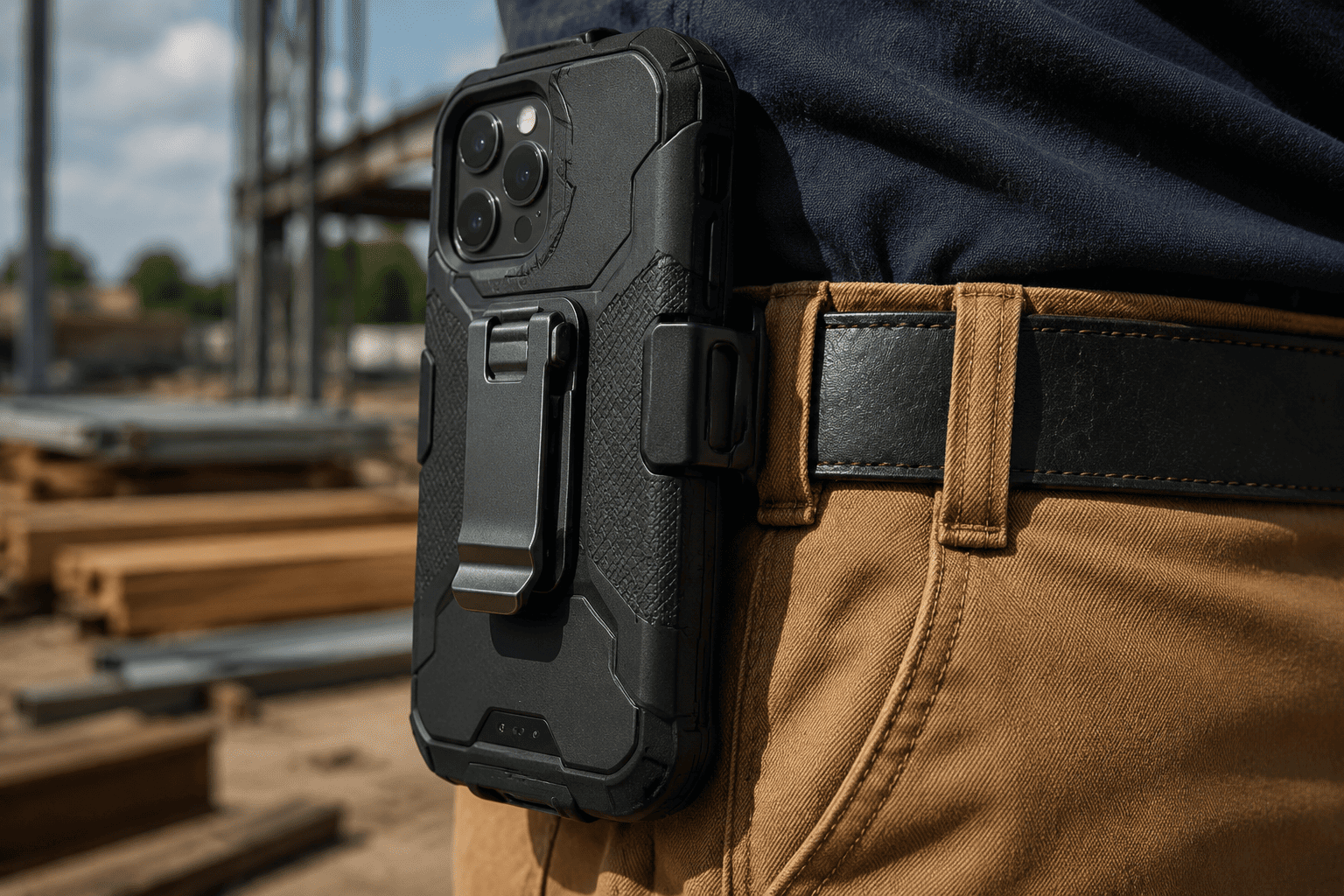
Older iPhones like the iPhone 7, iPhone 8, and iPhone SE often experience battery degradation after years of daily use. Replacing the battery is one option, but if you also want extra protection and significantly longer runtime, the Encased iPhone SE Charging Case is worth considering.
This case combines an extended battery with a rugged protective shell, making it especially useful for people who spend long hours away from a charger. Delivery drivers, field technicians, travelers, and anyone working outdoors can benefit from the added runtime.
One standout feature is the included belt clip holster, which makes carrying your phone much easier if you don’t like keeping it in your pocket all day. The protective design also adds extra durability compared to slimmer battery cases.
Priced at around $34.99, it’s more expensive than basic battery cases, but it’s aimed at people who need dependable all-day power rather than occasional top-ups.
If you’re still using an iPhone SE, iPhone 8, or iPhone 7 and don’t plan on upgrading soon, this accessory can extend the usefulness of your phone for another year or two.
What to Look for When Buying an iPhone Battery Case
Not every battery case is the right fit for every iPhone. Before buying one, keep these points in mind.
First, make sure it’s built specifically for your iPhone model. Even phones with similar dimensions often have different camera layouts or button placements, so compatibility is essential.
Think about how much extra battery you actually need. If you simply want enough power to get through a busy evening, a slim battery case may be the better choice. If you’re frequently away from outlets for an entire day, a higher capacity case will be more useful, even if it’s slightly bulkier.
Protection is another factor. Some battery cases focus on keeping the design as thin as possible, while others provide better drop protection along with the extra battery. Consider where and how you usually use your phone before deciding which style fits your routine.
Finally, don’t overlook convenience features. Support for MagSafe accessories, wireless charging compatibility, easy access to buttons and ports, and a comfortable grip can make a noticeable difference in daily use.
Final Thoughts
Most iPhone battery problems don’t require buying a new phone. In many cases, checking your battery health, reducing unnecessary background activity, adjusting a few settings, and following better charging habits can significantly improve how long your battery lasts each day.
If those changes still aren’t enough, a battery case can provide the extra runtime you need without carrying a separate power bank. For iPhone 17 Air owners who want an affordable, lightweight option, the iPhone Air MagSafe Battery Case is a practical choice. If you’re using an iPhone SE, iPhone 8, or iPhone 7 and need dependable all-day battery life with added protection, the Encased Charging Case offers a more rugged solution.
Start with the software fixes first. They cost nothing and often solve the problem. If your daily routine still leaves you searching for a charger before the day ends, one of these battery cases can help keep your iPhone powered when you need it most.